本项目基于DDRNet实现实时语义分割,将其由其他框架转为PaddlePaddle实现并轻量化,用深度可分卷积提升推理速度。使用surpvisely人像数据集,提供带中文注释的网络文件,需创建YML配置文件按PaddleSeg流程训练,还包含数据集处理、训练及测试相关代码与说明。
☞☞☞AI 智能聊天, 问答助手, AI 智能搜索, 免费无限量使用 DeepSeek R1 模型☜☜☜

      本项目是基于实时准确语义分割的深度双分辨率网络DDRNet创建的,其中DDRNet一个版本Cityscapes test上达到109 FPS / 77.4%mIoU!表现达到SOTA!综合性能优于SFNet、MSFNet和BiSeNetV2等网络。因为项目需求,需要使用到DDRNet,而paddleseg里面尚未内置有DDRNet的网络文件,而源代码作者已经开源,但是是基于其他框架实现的,所以我就将源代码改为使用paddlepaddle实现,并且将其做了一定的改进。
      1.本项目中的DDRNet的网络实现并不是原版,因为项目需要,所以我对其做了一定的轻量化处理,进行了将普通卷积替换成深度可分卷积等操作,让该网络的推理速度得到了进一步的提升。
      2.网络文件在Notebook处,可根据需要修改,并且将其按照PaddleSeg官方文档,进行自定义模型,完成训练。
      3.本项目的数据集是surpvisely人像数据集,可根据需要进行修改。
      4.网络文件已经进行了中文注释,方便阅读。
首先安装Paddleseg环境
此处使用gitee的下载联机,在国内使用下载更快
In [ ]!pip install paddlesegIn [ ]
!git clone https://gitee.com/PaddlePaddle/PaddleSegIn [1]
#进入数据集目录%cd data/data61378/
/home/aistudio/data/data61378In [ ]
#对数据集进行解压,并且返回根目录!unzip humanseg.zip%cd
因为本项目所使用的DDRNet并非paddleseg内置的网络模型
所以需要自己创建YML文件,以及模型文件,在下方的Code Block中已经给出,可根据需要自己更改,如不是很了解YML文件如何使用,可以在paddleseg的仓库中,找到相关的使用教程
此处附上链接: https://gitee.com/paddlepaddle/PaddleSeg#%E4%BD%BF%E7%94%A8%E6%95%99%E7%A8%8B-
YML配置文件,应创建在 work/PaddleSeg/configs/ddrnet/ddrnet.yml 路径下 下方为YML文件内容,复制粘贴进去即可
以下为YML文件配置
batch_size: 48 # 设定迭代一次送入网络的图片数量。一般来说,你所使用机器的显存越大,可以调高batch_size的值。iters: 5000 # 迭代次数model:
  type: DDRNet # 自定义模型类的名称
  num_classes: 2 # 标注图中像素类别个数。你的模型应该是根据具体的分割任务设计的,因此你知道该任务下像素类别个数
  pretrained: output/iter_12000 # 如果你有网络的与预训练参数,请指定其存放路径train_dataset:
  type: Dataset # 自定义数据集类的名称
  dataset_root: data/data61378/humanseg/
  train_path: data/data61378/humanseg/train.txt
  num_classes: 2   #此处为模型输出类别数, 本项目中为人像分割,所以有人像+背景两类,故为2
  transforms:
    - type: Resize
      target_size: [512, 512]    - type: ResizeStepScaling
      min_scale_factor: 0.5
      max_scale_factor: 2.0
      scale_step_size: 0.25
    - type: RandomPaddingCrop
      crop_size: [512, 512]    - type: RandomHorizontalFlip
    - type: RandomDistort
      brightness_range: 0.4
      contrast_range: 0.4
      saturation_range: 0.4
    - type: Normalize
  mode: train # 对训练集设定训练模式val_dataset:
  type: Dataset
  dataset_root: data/data61378/humanseg/
  val_path: data/data61378/humanseg/val.txt
  num_classes: 2
  transforms:
    - type: Resize
      target_size: [512, 512]    - type: Normalize
  mode: val # 对验证集设定验证模式optimizer: # 优化器设置
  type: sgd
  momentum: 0.9
  weight_decay: 4.0e-5lr_scheduler: # 学习率的设置
  type: PolynomialDecay
  learning_rate: 0.01
  power: 0.9
  end_lr: 0# lr_scheduler:#   type: ReduceOnPlateau#   learning_rate: 0.04#   mode: 'min'#   factor: 0.6#   patience: 1000#   threshold_mode: 'rel'#   verbose: Trueloss:
  types:
    - type: CrossEntropyLoss
  coef: [1]
接下来的两个Code Block为处理数据集的代码,将surpervisely数据集的格式处理为符合paddleseg套件的要求格式进行训练。
 成新网络商城购物系统
使用模板与程序分离的方式构建,依靠专门设计的数据库操作类实现数据库存取,具有专有错误处理模块,通过 Email 实时报告数据库错误,除具有满足购物需要的全部功能外,成新商城购物系统还对购物系统体系做了丰富的扩展,全新设计的搜索功能,自定义成新商城购物系统代码功能代码已经全面优化,杜绝SQL注入漏洞前台测试用户名:admin密码:admin888后台管理员名:admin密码:admin888
 0
查看详情
0
查看详情

数据处理完之后,会生成两个txt文件,train.txt文件和val.txt文件,分别对应训练数据集的路径,和验证数据集路径
In [2]#将数据集中的标签文件转换为符合paddle框架要求的标签文件#此处处理时间会比较久,需要稍微等待一下import cv2import osimport numpy as npfrom tqdm import tqdmdef three2one(path,path_):
img=cv2.imread(path)
img = cv2.cvtColor(img,cv2.COLOR_BGR2GRAY)
ret,img=cv2.threshold(img,2,255,cv2.THRESH_BINARY)
img = np.uint8((np.double(img)) / 255)
cv2.imwrite(path_,img)
root = r'data/data61378/humanseg/person_mask'root_ = r'data/data61378/humanseg/person_mask_data'if not os.path.exists(root_):
os.mkdir(root_)
names = os.listdir(root)for i,name in enumerate(names): if name[-2]=='n': # print(name[-3])
path = os.path.join(root,name)
path_ = os.path.join(root_,name) # print(path)
three2one(path,path_)# 适配数据集路径-0src_0 = r'data/data61378/humanseg/person_mask'dst_0 = r'data/data61378/humanseg/person_mask_orig'os.rename(src_0, dst_0)# 适配数据集路径-1src_1 = r'data/data61378/humanseg/person_mask_data'dst_1 = r'data/data61378/humanseg/person_mask'os.rename(src_1, dst_1)print('Done!')
Done!In [4]
###surpervisely数据集的label和train.txt的生成###挂载的数据集的label和train的txt文件里面的内容是重复的###将数据集打乱,按9:1比例划分训练集和验证集#进入目标目录%cd data/data61378/humansegimport osimport numpy as npfrom tqdm import tqdmimport matplotlib.pyplot as pltimport cv2from PIL import Image

data = []
path_img = 'person'path_lab = 'person_mask'train_txt = 'train.txt'label_txt = 'val.txt'def dataset(data, path_img, path_lab):

    for item in os.listdir(path_img):
        img = os.path.join(path_img, item)
        label = os.path.join(path_lab, item.split('.')[0] + '.png')
        data.append([os.path.join(path_img, item),
                     os.path.join(path_lab, item.split('.')[0] + '.png')
                     ])        if os.path.exists(img) and os.path.exists(label):            pass
        else:            raise 'path error!'
    np.random.shuffle(data)    # 划分训练集和验证集
    train_data = data[len(data) // 9:]
    val_data = data[:len(data) // 9]
    write_path(train_data, train_txt)
    write_path(val_data, label_txt)def write_path(data, path):
    with open(path ,'w') as f:        for item in tqdm(data):
            f.write(item[0] + ' ' + item[1] + '\n')        print('Done!')    print('Total: ', len(data))#显示出来看看对不对def draw(img_list, name=None):
    plt.figure(figsize=(20, 20))    for i in range(len(img_list)):
        plt.subplot(1, len(img_list), i+1)
        plt.imshow(img_list[i])        if name:
            plt.title(name[i])    #plt.legend()
    plt.show()#处理数据集图片dataset(data, path_img, path_lab)#展示测试img1 = cv2.cvtColor(cv2.imread('person/active-cold-female-girl-41371.jpeg'), cv2.COLOR_BGR2RGB)  # BGR -> RGBimg2_lab = cv2.imread('person_mask/active-cold-female-girl-41371.png')[..., 0]
draw([img1, img2_lab])#返回根目录%cd
100%|██████████| 5077/5077 [00:00<00:00, 936968.43it/s]
100%|██████████| 634/634 [00:00<00:00, 518562.55it/s]
/home/aistudio/data/data61378/humanseg
Done!
Total:  5077
Done!
Total:  634
<br/>
<Figure size 1440x1440 with 2 Axes>
/home/aistudio
下方的code blcok为DDRNet的实现
我对其进行了一定的轻量化处理,在性能降低很小的情况下,加快了在CPU上的推理速度。
自定义网络文件的路径为 work/PaddleSeg/paddleseg/models/ddrnet.py
并且需要在work/PaddleSeg/paddleseg/models/init.py 中进行初始化,具体使用教程在paddleseg仓库中已经有提及,并且非常详细。
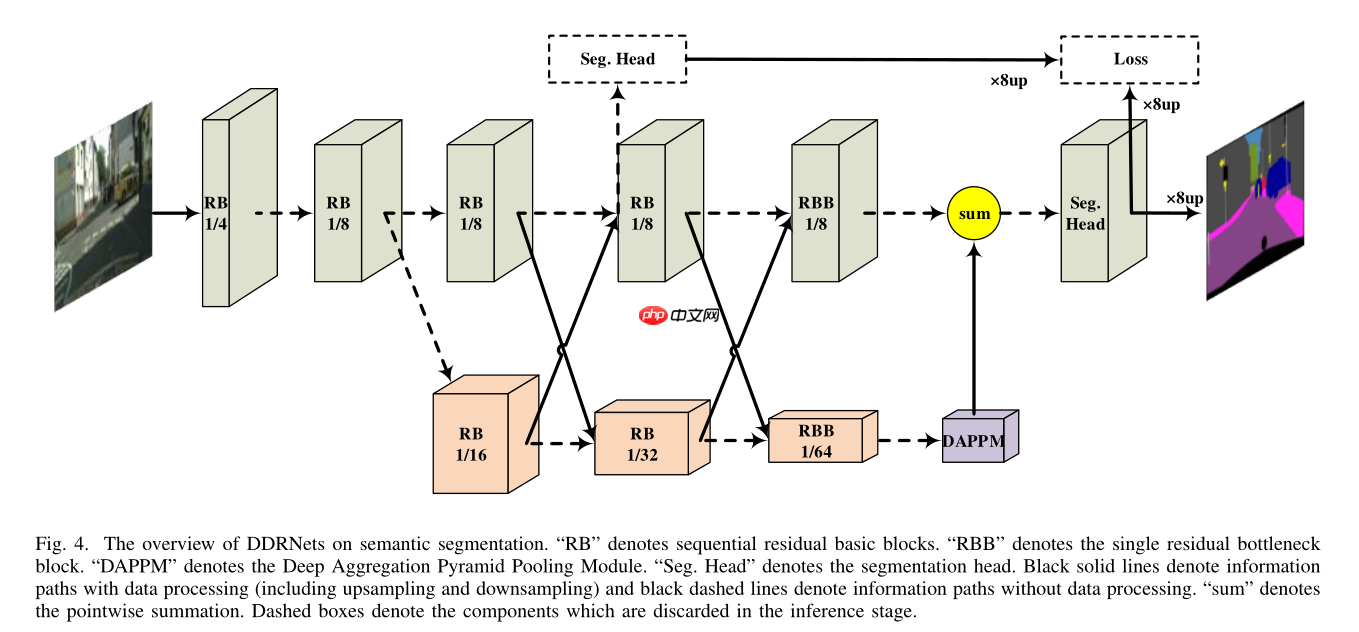
下图为DDRNet的结构图
'''
DDRNet网络文件,进行了轻量化,将卷积替换成深度可分卷积,并进行了channel_shuffle
目前测试,在CPU推理时间为200ms/张
GPU推理时间为60ms/张
'''from paddleseg.models import layersfrom paddleseg.cvlibs import managerfrom paddleseg.utils import utilsimport paddleimport paddle.nn as nnimport paddle.nn.functional as Fimport numpy as np
bn_mom = 0.1def channel_shuffle(x, groups):
### type: (torch.Tensor, int) -> torch.Tensor
#print(x.shape)
batchsize, num_channels, height, width = x.shape
channels_per_group = num_channels // groups # reshape
x = paddle.reshape(x, [batchsize, groups, channels_per_group, height, width])
x = paddle.transpose(x, [0, 2, 1, 3, 4]) # flatten
x = paddle.reshape(x, [batchsize, -1, height, width]) return xclass DwConv(nn.Layer):
def __init__(self, inplanes, out_channels, kernel_size=3, stride=1, padding=1,bias_attr=False):
super(DwConv, self).__init__()
self.depth_conv = nn.Conv2D(inplanes, inplanes, kernel_size=kernel_size, stride=stride, padding=padding, groups=inplanes, bias_attr=bias_attr)
self.point_conv = nn.Conv2D(inplanes, out_channels, kernel_size=1, stride=1, padding=0, groups=8,bias_attr=bias_attr) def forward(self, x):
x = self.depth_conv(x)
x = self.point_conv(x)
x = channel_shuffle(x, groups=8) return x#论文作者修改过了的resblockclass basicBlock(nn.Layer):
expansion = 1
def __init__(self,inplanes, out_channels, stride=1, downsample=None, no_relu=False):
super(basicBlock, self).__init__()
self.conv1 = DwConv(inplanes, out_channels, kernel_size=3,
stride=stride,padding=1)
self.bn1 = nn.BatchNorm2D(out_channels, momentum=bn_mom)
self.relu = nn.ReLU()
self.conv2 = DwConv(out_channels, out_channels,kernel_size=3,
stride=1,padding=1)
self.bn2 = nn.BatchNorm2D(out_channels, momentum=bn_mom)
self.downsample = downsample
self.stride = stride
self.no_relu = no_relu def forward(self, x):
res = x
out = self.conv1(x)
out = self.bn1(out)
out = self.relu(out)
out = self.conv2(out)
out = self.bn2(out) if self.downsample is not None:
res = self.downsample(x)
out += res if self.no_relu: return out else: return self.relu(out)class Bottleneck(nn.Layer):
expansion = 2 #通道扩大倍数
def __init__(self, inplanes, out_channels, stride=1, downsample=None, no_relu=True):
super(Bottleneck, self).__init__() super(Bottleneck, self).__init__()
self.conv1 = nn.Conv2D(inplanes, out_channels, kernel_size=1, bias_attr=False)
self.bn1 = nn.BatchNorm2D(out_channels, momentum=bn_mom)
self.conv2 = DwConv(out_channels, out_channels, kernel_size=3, stride=stride,
padding=1, bias_attr=False)
self.bn2 = nn.BatchNorm2D(out_channels, momentum=bn_mom)
self.conv3 = nn.Conv2D(out_channels, out_channels * self.expansion, kernel_size=1,
bias_attr=False)
self.bn3 = nn.BatchNorm2D(out_channels * self.expansion, momentum=bn_mom)
self.relu = nn.ReLU()
self.downsample = downsample
self.stride = stride
self.no_relu = no_relu def forward(self, x):
res = x
out = self.conv1(x)
out = self.bn1(out)
out = self.relu(out)
out = self.conv2(out)
out = self.bn2(out)
out = self.relu(out)
out = self.conv3(out)
out = self.bn3(out) if self.downsample is not None:
res = self.downsample(x)
out += res if self.no_relu: return out else: return self.relu(out)#论文中提出的特征提取结构 实验中效果比PPM更好class DAPPM(nn.Layer):
def __init__(self, inplanes, branch_planes, outplanes):
super(DAPPM, self).__init__() #获得不同感受野
self.scale0 = nn.Sequential(
 nn.BatchNorm2D(inplanes, momentum=bn_mom),
nn.ReLU(),
nn.Conv2D(inplanes, branch_planes, kernel_size=1, bias_attr=False),
)
self.scale1 = nn.Sequential(nn.AvgPool2D(kernel_size=5, stride=2, padding=2),
nn.BatchNorm2D(inplanes, momentum=bn_mom),
nn.ReLU(),
nn.Conv2D(inplanes, branch_planes, kernel_size=1, bias_attr=False),
)
self.scale2 = nn.Sequential(nn.AvgPool2D(kernel_size=9, stride=4, padding=4),
nn.BatchNorm2D(inplanes, momentum=bn_mom),
nn.ReLU(),
nn.Conv2D(inplanes, branch_planes, kernel_size=1, bias_attr=False),
)
self.scale3 = nn.Sequential(nn.AvgPool2D(kernel_size=17, stride=8, padding=8),
nn.BatchNorm2D(inplanes, momentum=bn_mom),
nn.ReLU(),
nn.Conv2D(inplanes, branch_planes, kernel_size=1, bias_attr=False),
)
self.scale4 = nn.Sequential(nn.AdaptiveAvgPool2D((1, 1)),
nn.BatchNorm2D(inplanes, momentum=bn_mom),
nn.ReLU(),
nn.Conv2D(inplanes, branch_planes, kernel_size=1, bias_attr=False),
) #对不同感受野特征图进行特征提取
self.process1 = nn.Sequential(
nn.BatchNorm2D(branch_planes, momentum=bn_mom),
nn.ReLU(),
DwConv(branch_planes, branch_planes, kernel_size=3, padding=1, bias_attr=False),
)
self.process2 = nn.Sequential(
nn.BatchNorm2D(branch_planes, momentum=bn_mom),
nn.ReLU(),
DwConv(branch_planes, branch_planes, kernel_size=3, padding=1, bias_attr=False),
)
self.process3 = nn.Sequential(
nn.BatchNorm2D(branch_planes, momentum=bn_mom),
nn.ReLU(),
DwConv(branch_planes, branch_planes, kernel_size=3, padding=1, bias_attr=False),
)
self.process4 = nn.Sequential(
nn.BatchNorm2D(branch_planes, momentum=bn_mom),
nn.ReLU(),
DwConv(branch_planes, branch_planes, kernel_size=3, padding=1, bias_attr=False),
) #concat层
self.compression = nn.Sequential(
nn.BatchNorm2D(branch_planes * 5, momentum=bn_mom),
nn.ReLU(),
nn.Conv2D(branch_planes * 5, outplanes, kernel_size=1, bias_attr=False),
)
self.shortcut = nn.Sequential(
nn.BatchNorm2D(inplanes, momentum=bn_mom),
nn.ReLU(),
nn.Conv2D(inplanes, outplanes, kernel_size=1, bias_attr=False),
) def forward(self, x):
# x.shape: NCHW
width = x.shape[-1]
height = x.shape[-2]
x_list = []
x_list.append(self.scale0(x))
x_list.append(self.process1((F.interpolate(self.scale1(x),
size=[height, width],
mode='bilinear') + x_list[0])))
x_list.append((self.process2((F.interpolate(self.scale2(x),
size=[height, width],
mode='bilinear') + x_list[1]))))
x_list.append(self.process3((F.interpolate(self.scale3(x),
size=[height, width],
mode='bilinear') + x_list[2])))
x_list.append(self.process4((F.interpolate(self.scale4(x),
size=[height, width],
mode='bilinear') + x_list[3]))) # NCHW
out = self.compression(paddle.concat(x_list, 1)) + self.shortcut(x) return outclass segmenthead(nn.Layer):
def __init__(self, inplanes, interplanes, outplanes, scale_factor=None):
super(segmenthead, self).__init__()
self.bn1 = nn.BatchNorm2D(inplanes, momentum=bn_mom)
self.conv1 = DwConv(inplanes, interplanes, kernel_size=3, padding=1, bias_attr=False)
self.bn2 = nn.BatchNorm2D(interplanes, momentum=bn_mom)
self.relu = nn.ReLU()
self.conv2 = nn.Conv2D(interplanes, outplanes, kernel_size=1, padding=0, bias_attr=True)
self.scale_factor = scale_factor def forward(self, x):
x = self.conv1(self.relu(self.bn1(x)))
out = self.conv2(self.relu(self.bn2(x))) if self.scale_factor is not None:
height = x.shape[-2] * self.scale_factor
width = x.shape[-1] * self.scale_factor
out = F.interpolate(out,
size=[height, width],
mode='bilinear') return outclass DualRseNet(nn.Layer): #双边残存网络
def __init__(self, block, layers, num_classes=2, planes=64, spp_planes=128, head_planes=128, augment=False,pretrained=None):
super(DualRseNet, self).__init__()
hige_planes = planes * 2
self.augment = augment
self.pretrained = pretrained
self.conv1 = nn.Sequential(
nn.Conv2D(in_channels=3, out_channels=planes, kernel_size=3, stride=2, padding=1),
nn.BatchNorm2D(planes, momentum=bn_mom),
nn.ReLU(),
DwConv(planes,planes,kernel_size=3, stride=2, padding=1),
nn.BatchNorm2D(planes, momentum=bn_mom),
nn.ReLU()
)
self.relu = nn.ReLU()
self.layer1 = self._make_layer(block, planes, planes, layers[0])
self.layer2 = self._make_layer(block, planes, planes * 2, layers[1], stride=2)
self.layer3 = self._make_layer(block, planes * 2, planes * 4, layers[2], stride=2)
self.layer4 = self._make_layer(block, planes * 4, planes * 8, layers[3], stride=2)
self.compression3 = nn.Sequential(
nn.Conv2D(planes * 4, hige_planes, kernel_size=1, bias_attr=False),
nn.BatchNorm2D(hige_planes, momentum=bn_mom),
)
self.compression4 = nn.Sequential(
nn.Conv2D(planes * 8, hige_planes, kernel_size=1, bias_attr=False),
nn.BatchNorm2D(hige_planes, momentum=bn_mom),
)
self.down3 = nn.Sequential(
DwConv(hige_planes, planes * 4, kernel_size=3, stride=2, padding=1, bias_attr=False),
nn.BatchNorm2D(planes * 4, momentum=bn_mom),
)
self.down4 = nn.Sequential(
DwConv(hige_planes, planes * 4, kernel_size=3, stride=2, padding=1, bias_attr=False),
nn.BatchNorm2D(planes * 4, momentum=bn_mom),
nn.ReLU(),
DwConv(planes * 4, planes * 8, kernel_size=3, stride=2, padding=1, bias_attr=False),
nn.BatchNorm2D(planes * 8, momentum=bn_mom),
)
self.layer3_ = self._make_layer(block, planes * 2, hige_planes, 2)
self.layer4_ = self._make_layer(block, hige_planes, hige_planes, 2)
self.layer5_ = self._make_layer(Bottleneck, hige_planes, hige_planes, 1)
self.layer5 = self._make_layer(Bottleneck, planes * 8, planes * 8, 1, stride=2)
self.spp = DAPPM(planes * 16, spp_planes, planes * 4) # segmenthead 分割头
if self.augment:
self.seghead_extra = segmenthead(hige_planes, head_planes, num_classes)
self.final_layer = segmenthead(planes * 4, head_planes, num_classes) for m in self.sublayers(): if isinstance(m, nn.Conv2D):
n = m.weight.shape[0]*m.weight.shape[1]*m.weight.shape[2]
v = np.random.normal(loc=0.,scale=np.sqrt(2./n),size=m.weight.shape).astype('float32')
m.weight.set_value(v) elif isinstance(m, nn.BatchNorm):
m.weight.set_value(np.ones(m.weight.shape).astype('float32'))
m.bias.set_value(np.zeros(m.bias.shape).astype('float32'))
self.init_weight() #残差结构的生成
def _make_layer(self, block, inplanes, planes, blocks, stride=1):
downsample = None
if stride != 1 or inplanes != planes * block.expansion: # basic.expansion=1 bottle.expansion=2
downsample = nn.Sequential( # 使用conv进行下采样
nn.Conv2D(inplanes, planes * block.expansion,
kernel_size=1, stride=stride, bias_attr=False),
nn.BatchNorm2D(planes * block.expansion, momentum=bn_mom),
)
layers = []
layers.append(block(inplanes, planes, stride, downsample)) # 1个block
inplanes = planes * block.expansion for i in range(1, blocks): if i == (blocks - 1):
layers.append(block(inplanes, planes, stride=1, no_relu=True)) # 最后一个层使用relu输出
else:
layers.append(block(inplanes, planes, stride=1, no_relu=False)) return nn.Sequential(*layers) def forward(self, x):
# x.shape: NCHW
input = x
width_output = x.shape[-1] // 8
height_output = x.shape[-2] // 8
layers = []
x = self.conv1(x) # conv1
x = self.layer1(x)
layers.append(x) # conv2 layer[0]
x = self.layer2(self.relu(x))
layers.append(x) # conv3 layer[1]
x = self.layer3(self.relu(x)) # 低分辨率层
layers.append(x) # conv4 layer[2]
x_ = self.layer3_(self.relu(layers[1])) # 复制一份 高分辨率层
# Bilateral fusion 论文中的融合方法
x = x + self.down3(self.relu(x_)) # 高分辨率 通过conv下采样 与低分辨率相加
x_ = x_ + F.interpolate( # 低分辨率上采样后和高分辨率相加
self.compression3(self.relu(layers[2])), # 1x1conv 将通道下降
size=[height_output, width_output],
mode='bilinear') if self.augment:
temp = x_ # Conv5_1 使用basicblock
x = self.layer4(self.relu(x)) # 低分辨率层
layers.append(x) # conv5_1 layer[3]
x_ = self.layer4_(self.relu(x_)) # 高分辨率
# Bilateral fusion
x = x + self.down4(self.relu(x_)) # 高分辨率 通过conv下采样 与低分辨率相加
x_ = x_ + F.interpolate( # 低分辨率上采样后和高分辨率相加
self.compression4(self.relu(layers[3])), # 1x1conv 将通道下降
size=[height_output, width_output],
mode='bilinear') #print(x_)
#Conv5_1阶段 使用bottleblock
x_ = self.layer5_(self.relu(x_)) # 高分通道
x = F.interpolate( # 低分通道
self.spp(self.layer5(self.relu(x))), # 使用DAPPM进行多尺度特征融合
size=[height_output, width_output],
mode='bilinear')
x_ = self.final_layer(x + x_) if self.augment: #辅助计算损失
x_extra = self.seghead_extra(temp) return [x_, x_extra] else: return [F.interpolate(x_,
size=[input.shape[-2],input.shape[-1]],
mode='bilinear')]
def init_weight(self):
if self.pretrained is not None:
utils.load_entire_model(self, self.pretrained)
def DualResNet_imagenet(num_classes, pretrained=None):
model = DualRseNet(basicBlock, [2, 2, 2, 2], num_classes=num_classes, planes=32, spp_planes=128, head_planes=64, augment=False, pretrained=pretrained) #加载预训练模型 填入地址
return model@manager.MODELS.add_componentdef DDRNet(num_classes, pretrained):
model = DualResNet_imagenet(num_classes=num_classes, pretrained=pretrained) return model
nn.BatchNorm2D(inplanes, momentum=bn_mom),
nn.ReLU(),
nn.Conv2D(inplanes, branch_planes, kernel_size=1, bias_attr=False),
)
self.scale1 = nn.Sequential(nn.AvgPool2D(kernel_size=5, stride=2, padding=2),
nn.BatchNorm2D(inplanes, momentum=bn_mom),
nn.ReLU(),
nn.Conv2D(inplanes, branch_planes, kernel_size=1, bias_attr=False),
)
self.scale2 = nn.Sequential(nn.AvgPool2D(kernel_size=9, stride=4, padding=4),
nn.BatchNorm2D(inplanes, momentum=bn_mom),
nn.ReLU(),
nn.Conv2D(inplanes, branch_planes, kernel_size=1, bias_attr=False),
)
self.scale3 = nn.Sequential(nn.AvgPool2D(kernel_size=17, stride=8, padding=8),
nn.BatchNorm2D(inplanes, momentum=bn_mom),
nn.ReLU(),
nn.Conv2D(inplanes, branch_planes, kernel_size=1, bias_attr=False),
)
self.scale4 = nn.Sequential(nn.AdaptiveAvgPool2D((1, 1)),
nn.BatchNorm2D(inplanes, momentum=bn_mom),
nn.ReLU(),
nn.Conv2D(inplanes, branch_planes, kernel_size=1, bias_attr=False),
) #对不同感受野特征图进行特征提取
self.process1 = nn.Sequential(
nn.BatchNorm2D(branch_planes, momentum=bn_mom),
nn.ReLU(),
DwConv(branch_planes, branch_planes, kernel_size=3, padding=1, bias_attr=False),
)
self.process2 = nn.Sequential(
nn.BatchNorm2D(branch_planes, momentum=bn_mom),
nn.ReLU(),
DwConv(branch_planes, branch_planes, kernel_size=3, padding=1, bias_attr=False),
)
self.process3 = nn.Sequential(
nn.BatchNorm2D(branch_planes, momentum=bn_mom),
nn.ReLU(),
DwConv(branch_planes, branch_planes, kernel_size=3, padding=1, bias_attr=False),
)
self.process4 = nn.Sequential(
nn.BatchNorm2D(branch_planes, momentum=bn_mom),
nn.ReLU(),
DwConv(branch_planes, branch_planes, kernel_size=3, padding=1, bias_attr=False),
) #concat层
self.compression = nn.Sequential(
nn.BatchNorm2D(branch_planes * 5, momentum=bn_mom),
nn.ReLU(),
nn.Conv2D(branch_planes * 5, outplanes, kernel_size=1, bias_attr=False),
)
self.shortcut = nn.Sequential(
nn.BatchNorm2D(inplanes, momentum=bn_mom),
nn.ReLU(),
nn.Conv2D(inplanes, outplanes, kernel_size=1, bias_attr=False),
) def forward(self, x):
# x.shape: NCHW
width = x.shape[-1]
height = x.shape[-2]
x_list = []
x_list.append(self.scale0(x))
x_list.append(self.process1((F.interpolate(self.scale1(x),
size=[height, width],
mode='bilinear') + x_list[0])))
x_list.append((self.process2((F.interpolate(self.scale2(x),
size=[height, width],
mode='bilinear') + x_list[1]))))
x_list.append(self.process3((F.interpolate(self.scale3(x),
size=[height, width],
mode='bilinear') + x_list[2])))
x_list.append(self.process4((F.interpolate(self.scale4(x),
size=[height, width],
mode='bilinear') + x_list[3]))) # NCHW
out = self.compression(paddle.concat(x_list, 1)) + self.shortcut(x) return outclass segmenthead(nn.Layer):
def __init__(self, inplanes, interplanes, outplanes, scale_factor=None):
super(segmenthead, self).__init__()
self.bn1 = nn.BatchNorm2D(inplanes, momentum=bn_mom)
self.conv1 = DwConv(inplanes, interplanes, kernel_size=3, padding=1, bias_attr=False)
self.bn2 = nn.BatchNorm2D(interplanes, momentum=bn_mom)
self.relu = nn.ReLU()
self.conv2 = nn.Conv2D(interplanes, outplanes, kernel_size=1, padding=0, bias_attr=True)
self.scale_factor = scale_factor def forward(self, x):
x = self.conv1(self.relu(self.bn1(x)))
out = self.conv2(self.relu(self.bn2(x))) if self.scale_factor is not None:
height = x.shape[-2] * self.scale_factor
width = x.shape[-1] * self.scale_factor
out = F.interpolate(out,
size=[height, width],
mode='bilinear') return outclass DualRseNet(nn.Layer): #双边残存网络
def __init__(self, block, layers, num_classes=2, planes=64, spp_planes=128, head_planes=128, augment=False,pretrained=None):
super(DualRseNet, self).__init__()
hige_planes = planes * 2
self.augment = augment
self.pretrained = pretrained
self.conv1 = nn.Sequential(
nn.Conv2D(in_channels=3, out_channels=planes, kernel_size=3, stride=2, padding=1),
nn.BatchNorm2D(planes, momentum=bn_mom),
nn.ReLU(),
DwConv(planes,planes,kernel_size=3, stride=2, padding=1),
nn.BatchNorm2D(planes, momentum=bn_mom),
nn.ReLU()
)
self.relu = nn.ReLU()
self.layer1 = self._make_layer(block, planes, planes, layers[0])
self.layer2 = self._make_layer(block, planes, planes * 2, layers[1], stride=2)
self.layer3 = self._make_layer(block, planes * 2, planes * 4, layers[2], stride=2)
self.layer4 = self._make_layer(block, planes * 4, planes * 8, layers[3], stride=2)
self.compression3 = nn.Sequential(
nn.Conv2D(planes * 4, hige_planes, kernel_size=1, bias_attr=False),
nn.BatchNorm2D(hige_planes, momentum=bn_mom),
)
self.compression4 = nn.Sequential(
nn.Conv2D(planes * 8, hige_planes, kernel_size=1, bias_attr=False),
nn.BatchNorm2D(hige_planes, momentum=bn_mom),
)
self.down3 = nn.Sequential(
DwConv(hige_planes, planes * 4, kernel_size=3, stride=2, padding=1, bias_attr=False),
nn.BatchNorm2D(planes * 4, momentum=bn_mom),
)
self.down4 = nn.Sequential(
DwConv(hige_planes, planes * 4, kernel_size=3, stride=2, padding=1, bias_attr=False),
nn.BatchNorm2D(planes * 4, momentum=bn_mom),
nn.ReLU(),
DwConv(planes * 4, planes * 8, kernel_size=3, stride=2, padding=1, bias_attr=False),
nn.BatchNorm2D(planes * 8, momentum=bn_mom),
)
self.layer3_ = self._make_layer(block, planes * 2, hige_planes, 2)
self.layer4_ = self._make_layer(block, hige_planes, hige_planes, 2)
self.layer5_ = self._make_layer(Bottleneck, hige_planes, hige_planes, 1)
self.layer5 = self._make_layer(Bottleneck, planes * 8, planes * 8, 1, stride=2)
self.spp = DAPPM(planes * 16, spp_planes, planes * 4) # segmenthead 分割头
if self.augment:
self.seghead_extra = segmenthead(hige_planes, head_planes, num_classes)
self.final_layer = segmenthead(planes * 4, head_planes, num_classes) for m in self.sublayers(): if isinstance(m, nn.Conv2D):
n = m.weight.shape[0]*m.weight.shape[1]*m.weight.shape[2]
v = np.random.normal(loc=0.,scale=np.sqrt(2./n),size=m.weight.shape).astype('float32')
m.weight.set_value(v) elif isinstance(m, nn.BatchNorm):
m.weight.set_value(np.ones(m.weight.shape).astype('float32'))
m.bias.set_value(np.zeros(m.bias.shape).astype('float32'))
self.init_weight() #残差结构的生成
def _make_layer(self, block, inplanes, planes, blocks, stride=1):
downsample = None
if stride != 1 or inplanes != planes * block.expansion: # basic.expansion=1 bottle.expansion=2
downsample = nn.Sequential( # 使用conv进行下采样
nn.Conv2D(inplanes, planes * block.expansion,
kernel_size=1, stride=stride, bias_attr=False),
nn.BatchNorm2D(planes * block.expansion, momentum=bn_mom),
)
layers = []
layers.append(block(inplanes, planes, stride, downsample)) # 1个block
inplanes = planes * block.expansion for i in range(1, blocks): if i == (blocks - 1):
layers.append(block(inplanes, planes, stride=1, no_relu=True)) # 最后一个层使用relu输出
else:
layers.append(block(inplanes, planes, stride=1, no_relu=False)) return nn.Sequential(*layers) def forward(self, x):
# x.shape: NCHW
input = x
width_output = x.shape[-1] // 8
height_output = x.shape[-2] // 8
layers = []
x = self.conv1(x) # conv1
x = self.layer1(x)
layers.append(x) # conv2 layer[0]
x = self.layer2(self.relu(x))
layers.append(x) # conv3 layer[1]
x = self.layer3(self.relu(x)) # 低分辨率层
layers.append(x) # conv4 layer[2]
x_ = self.layer3_(self.relu(layers[1])) # 复制一份 高分辨率层
# Bilateral fusion 论文中的融合方法
x = x + self.down3(self.relu(x_)) # 高分辨率 通过conv下采样 与低分辨率相加
x_ = x_ + F.interpolate( # 低分辨率上采样后和高分辨率相加
self.compression3(self.relu(layers[2])), # 1x1conv 将通道下降
size=[height_output, width_output],
mode='bilinear') if self.augment:
temp = x_ # Conv5_1 使用basicblock
x = self.layer4(self.relu(x)) # 低分辨率层
layers.append(x) # conv5_1 layer[3]
x_ = self.layer4_(self.relu(x_)) # 高分辨率
# Bilateral fusion
x = x + self.down4(self.relu(x_)) # 高分辨率 通过conv下采样 与低分辨率相加
x_ = x_ + F.interpolate( # 低分辨率上采样后和高分辨率相加
self.compression4(self.relu(layers[3])), # 1x1conv 将通道下降
size=[height_output, width_output],
mode='bilinear') #print(x_)
#Conv5_1阶段 使用bottleblock
x_ = self.layer5_(self.relu(x_)) # 高分通道
x = F.interpolate( # 低分通道
self.spp(self.layer5(self.relu(x))), # 使用DAPPM进行多尺度特征融合
size=[height_output, width_output],
mode='bilinear')
x_ = self.final_layer(x + x_) if self.augment: #辅助计算损失
x_extra = self.seghead_extra(temp) return [x_, x_extra] else: return [F.interpolate(x_,
size=[input.shape[-2],input.shape[-1]],
mode='bilinear')]
def init_weight(self):
if self.pretrained is not None:
utils.load_entire_model(self, self.pretrained)
def DualResNet_imagenet(num_classes, pretrained=None):
model = DualRseNet(basicBlock, [2, 2, 2, 2], num_classes=num_classes, planes=32, spp_planes=128, head_planes=64, augment=False, pretrained=pretrained) #加载预训练模型 填入地址
return model@manager.MODELS.add_componentdef DDRNet(num_classes, pretrained):
model = DualResNet_imagenet(num_classes=num_classes, pretrained=pretrained) return model
!python work/PaddleSeg/train.py \
       --config work/PaddleSeg/configs/ddrnet/ddrnet.yml \
       --do_eval \
       --s*e_interval 500 \
       --s*e_dir output
2025-03-17 16:58:22 [INFO]
------------Environment Information-------------
platform: Linux-4.4.0-150-generic-x86_64-with-debian-stretch-sid
Python: 3.7.4 (default, Aug 13 2019, 20:35:49) [GCC 7.3.0]
Paddle compiled with cuda: True
NVCC: Cuda compilation tools, release 10.1, V10.1.243
cudnn: 7.6
GPUs used: 1
CUDA_VISIBLE_DEVICES: None
GPU: ['GPU 0: Tesla V100-SXM2-32GB']
GCC: gcc (Ubuntu 7.5.0-3ubuntu1~16.04) 7.5.0
PaddleSeg: 2.4.0
PaddlePaddle: 2.2.2
OpenCV: 4.1.1
------------------------------------------------
2025-03-17 16:58:22 [INFO]
---------------Config Information---------------
batch_size: 48
iters: 5000
loss:
  coef:
  - 1
  types:
  - ignore_index: 255
    type: CrossEntropyLoss
lr_scheduler:
  end_lr: 0
  learning_rate: 0.01
  power: 0.9
  type: PolynomialDecay
model:
  num_classes: 2
  pretrained: null
  type: DDRNet
optimizer:
  momentum: 0.9
  type: sgd
  weight_decay: 4.0e-05
train_dataset:
  dataset_root: data/data61378/humanseg/
  mode: train
  num_classes: 2
  train_path: data/data61378/humanseg/train.txt
  transforms:
  - target_size:
    - 640
    - 640
    type: Resize
  - max_scale_factor: 2.0
    min_scale_factor: 0.5
    scale_step_size: 0.25
    type: ResizeStepScaling
  - crop_size:
    - 640
    - 640
    type: RandomPaddingCrop
  - type: RandomHorizontalFlip
  - brightness_range: 0.4
    contrast_range: 0.4
    saturation_range: 0.4
    type: RandomDistort
  - type: Normalize
  type: Dataset
val_dataset:
  dataset_root: data/data61378/humanseg/
  mode: val
  num_classes: 2
  transforms:
  - target_size:
    - 640
    - 640
    type: Resize
  - type: Normalize
  type: Dataset
  val_path: data/data61378/humanseg/val.txt
------------------------------------------------
W0317 16:58:22.691426  3549 device_context.cc:447] Please NOTE: device: 0, GPU Compute Capability: 7.0, Driver API Version: 10.1, Runtime API Version: 10.1
W0317 16:58:22.691483  3549 device_context.cc:465] device: 0, cuDNN Version: 7.6.
/opt/conda/envs/python35-paddle120-env/lib/python3.7/site-packages/paddle/nn/layer/norm.py:653: UserWarning: When training, we now always track global mean and variance.
  "When training, we now always track global mean and variance.")
/opt/conda/envs/python35-paddle120-env/lib/python3.7/site-packages/paddle/fluid/dygraph/math_op_patch.py:253: UserWarning: The dtype of left and right variables are not the same, left dtype is paddle.float32, but right dtype is paddle.int64, the right dtype will convert to paddle.float32
  format(lhs_dtype, rhs_dtype, lhs_dtype))
2025-03-17 16:59:33 [INFO]	[TRAIN] epoch: 1, iter: 10/5000, loss: 0.6333, lr: 0.009984, batch_cost: 6.6284, reader_cost: 6.25825, ips: 7.2416 samples/sec | ETA 09:11:15
^C
需要自己上次图片,然后在image_path填好路径噢
输出的路径为s*e_dir处,根据自己需求更改
In [ ]!python work/PaddleSeg/predict.py \
--config work/PaddleSeg/configs/ddrnet/ddrnet.yml \
--model_path output/best_model/model.pdparams\
--image_path data/test.png \
--s*e_dir output/result
import numpy as npfrom PIL import Image

img= Image.open('output/result/added_prediction/result.png')
img.show()
<PIL.PngImagePlugin.PngImageFile image mode=RGB size=944x627 at 0x7F5DAAAA92D0>
以上就是DDRNet-通过PaddleSeg实现全流程跑通的详细内容,更多请关注其它相关文章!
# 进行了
# 移动网站建设案例教程书
# 软文推广营销案例
# 网站如何用抖音推广
# 营销推广程序图片素材
# 大兴区网站建设价格多少
# 新乡seo万词霸屏推广
# 天津seo管理
# 比特币网站推广
# 绍兴网站优化注意事项
# 手机价格网站建设
# 开源
# 离线
# 辨率
# 中文网
# 将其
# linux
# 低分
# 自定义
# 购物系统
# 成新
# type
# fig
# latte
# udio
# asic
# igs
# red
# cos
# ai
# git
# python
相关栏目:
【
Google疑问12 】
【
Facebook疑问10 】
【
优化推广96088 】
【
技术知识133117 】
【
IDC资讯59369 】
【
网络运营7196 】
【
IT资讯61894 】
相关推荐:
Moka发布AI原生HR SaaS产品“Moka Eva”,布局AGI时代
大模型新品出现井喷,AI产业迎来新时代
英特尔张宇:边缘计算在整个AI生态系统中扮演重要角色
梦想实现!硬核科幻大片VR智能头盔即将问世
AIGC浪潮下,联想集团再加码计算与人工智能
Moka AI产品后观察:HR SaaS迈进AGI时代
静安大宁功能区企业云天励飞亮相2025世界人工智能大会,秀出AI硬实力!
支持跨语言、人声狗吠互换,仅利用最近邻的简单语音转换模型有多神奇
AI生成会议纪要 百度如流升级推出超级助手、智能编码等功能
OpenAI大神Karpathy最新分享:为什么OpenAI内部对AI Agents最感兴趣
人工智能创作的“婴儿版超级英雄”,你觉得哪个最可爱
改变城市交通:智慧城市中的智能交通
2025世界人工智能大会前沿科技共绘“未来”图景, 这家这家独角兽企业的通用大脑将在AI领域大放异彩
从GOXR到PartyOn,XRSPACE致力打造多元共赢的元宇宙世界
一次购买全年省心,入手科沃斯这几台机器人,省下时间就是金钱
网易易盾 AI Lab 论文入选 ICASSP 2025!黑科技让语音识别越“听”越准
新闻传闻:迪士尼可能采用人工智能来控制电影制作成本
测试框架-安全和自动驾驶
看懂AI,找到增长新势能 | 笔记侠AI峰会等你来
乐天派AI桌面机器人提供的正能量情绪价值直接拉满,妥妥的治愈系
羊驼家族大模型集体进化!32k上下文追平GPT-4,田渊栋团队出品
MiracleVision视觉大模型
定义人工智能的十个关键术语
扎克·施奈德新片《月球叛军》曝剧照 机器人首度现身
令人惊叹!AI模型能够以iPhone照片为基础创作诗歌
标贝科技亮相国际顶会ICASSP2025 加速布局海外AI数据市场
无需标注数据,「3D理解」进入多模态预训练时代!ULIP系列全面开源,刷新SOTA
两架海燕号无人机交付中国气象局 助力建设国家级机动气象观测业务
昆仑万维与全球领先的元宇宙公司Meta达成商务合作,共同认可昆仑万维在XR领域的技术实力
社区里,孩子们体验“机器人竞技”
微幼科技晨检机器人与人工晨检相比,有何优势
焊接协作机器人或将成为26届埃森展最大看点
25个AI智能体源码现已公开,灵感来自斯坦福的「虚拟小镇」和《西部世界》
一文看懂基础模型的定义和工作原理
Meta 推出 Quest 超级分辨率技术,让 VR 画面更清晰
尼康尼克尔 Z 180-600mm f/5.6-6.3 VR 镜头发布,12499 元
人工智能和神经网络有什么联系与区别?
特斯拉机器人面世 未来将大幅提振磁材需求,引领人工智能时代
华为小艺AI助手将实现强大的大模型能力
机器人加速!稀土永磁也被带火,持续性如何?
OpenAI宣布在伦敦设立海外分部,要招揽“世界级人才”
能抓取玻璃碎片、水下透明物,清华提出通用型透明物体抓取框架,成功率极高
懒人必备的家居清洁好物,石头自清洁扫拖机器人G20
小米又拿下国际比赛第一:AI翻译立功
商汤科技:元萝卜 AI 下棋机器人新品发布会 6 月 14 日举行
田渊栋新作:打开1层Transformer黑盒,注意力机制没那么神秘
眼球反射解锁3D世界,黑镜成真!马里兰华人新作炸翻科幻迷
利好来了,AI再起一波?
张勇对话多位诺奖得主 人工智能将无处不在
管提需求,大模型解决问题:图表处理神器SheetCopilot上线
2025-07-28

运城市盐湖区信雨科技有限公司是一家深耕海外推广领域十年的专业服务商,作为谷歌推广与Facebook广告全球合作伙伴,聚焦外贸企业出海痛点,以数字化营销为核心,提供一站式海外营销解决方案。公司凭借十年行业沉淀与平台官方资源加持,打破传统外贸获客壁垒,助力企业高效开拓全球市场,成为中小企业出海的可靠合作伙伴。

 nn.BatchNorm2D(inplanes, momentum=bn_mom),
nn.ReLU(),
nn.Conv2D(inplanes, branch_planes, kernel_size=1, bias_attr=False),
)
self.scale1 = nn.Sequential(nn.AvgPool2D(kernel_size=5, stride=2, padding=2),
nn.BatchNorm2D(inplanes, momentum=bn_mom),
nn.ReLU(),
nn.Conv2D(inplanes, branch_planes, kernel_size=1, bias_attr=False),
)
self.scale2 = nn.Sequential(nn.AvgPool2D(kernel_size=9, stride=4, padding=4),
nn.BatchNorm2D(inplanes, momentum=bn_mom),
nn.ReLU(),
nn.Conv2D(inplanes, branch_planes, kernel_size=1, bias_attr=False),
)
self.scale3 = nn.Sequential(nn.AvgPool2D(kernel_size=17, stride=8, padding=8),
nn.BatchNorm2D(inplanes, momentum=bn_mom),
nn.ReLU(),
nn.Conv2D(inplanes, branch_planes, kernel_size=1, bias_attr=False),
)
self.scale4 = nn.Sequential(nn.AdaptiveAvgPool2D((1, 1)),
nn.BatchNorm2D(inplanes, momentum=bn_mom),
nn.ReLU(),
nn.Conv2D(inplanes, branch_planes, kernel_size=1, bias_attr=False),
) #对不同感受野特征图进行特征提取
self.process1 = nn.Sequential(
nn.BatchNorm2D(branch_planes, momentum=bn_mom),
nn.ReLU(),
DwConv(branch_planes, branch_planes, kernel_size=3, padding=1, bias_attr=False),
)
self.process2 = nn.Sequential(
nn.BatchNorm2D(branch_planes, momentum=bn_mom),
nn.ReLU(),
DwConv(branch_planes, branch_planes, kernel_size=3, padding=1, bias_attr=False),
)
self.process3 = nn.Sequential(
nn.BatchNorm2D(branch_planes, momentum=bn_mom),
nn.ReLU(),
DwConv(branch_planes, branch_planes, kernel_size=3, padding=1, bias_attr=False),
)
self.process4 = nn.Sequential(
nn.BatchNorm2D(branch_planes, momentum=bn_mom),
nn.ReLU(),
DwConv(branch_planes, branch_planes, kernel_size=3, padding=1, bias_attr=False),
) #concat层
self.compression = nn.Sequential(
nn.BatchNorm2D(branch_planes * 5, momentum=bn_mom),
nn.ReLU(),
nn.Conv2D(branch_planes * 5, outplanes, kernel_size=1, bias_attr=False),
)
self.shortcut = nn.Sequential(
nn.BatchNorm2D(inplanes, momentum=bn_mom),
nn.ReLU(),
nn.Conv2D(inplanes, outplanes, kernel_size=1, bias_attr=False),
) def forward(self, x):
# x.shape: NCHW
width = x.shape[-1]
height = x.shape[-2]
x_list = []
x_list.append(self.scale0(x))
x_list.append(self.process1((F.interpolate(self.scale1(x),
size=[height, width],
mode='bilinear') + x_list[0])))
x_list.append((self.process2((F.interpolate(self.scale2(x),
size=[height, width],
mode='bilinear') + x_list[1]))))
x_list.append(self.process3((F.interpolate(self.scale3(x),
size=[height, width],
mode='bilinear') + x_list[2])))
x_list.append(self.process4((F.interpolate(self.scale4(x),
size=[height, width],
mode='bilinear') + x_list[3]))) # NCHW
out = self.compression(paddle.concat(x_list, 1)) + self.shortcut(x) return outclass segmenthead(nn.Layer):
def __init__(self, inplanes, interplanes, outplanes, scale_factor=None):
super(segmenthead, self).__init__()
self.bn1 = nn.BatchNorm2D(inplanes, momentum=bn_mom)
self.conv1 = DwConv(inplanes, interplanes, kernel_size=3, padding=1, bias_attr=False)
self.bn2 = nn.BatchNorm2D(interplanes, momentum=bn_mom)
self.relu = nn.ReLU()
self.conv2 = nn.Conv2D(interplanes, outplanes, kernel_size=1, padding=0, bias_attr=True)
self.scale_factor = scale_factor def forward(self, x):
x = self.conv1(self.relu(self.bn1(x)))
out = self.conv2(self.relu(self.bn2(x))) if self.scale_factor is not None:
height = x.shape[-2] * self.scale_factor
width = x.shape[-1] * self.scale_factor
out = F.interpolate(out,
size=[height, width],
mode='bilinear') return outclass DualRseNet(nn.Layer): #双边残存网络
def __init__(self, block, layers, num_classes=2, planes=64, spp_planes=128, head_planes=128, augment=False,pretrained=None):
super(DualRseNet, self).__init__()
hige_planes = planes * 2
self.augment = augment
self.pretrained = pretrained
self.conv1 = nn.Sequential(
nn.Conv2D(in_channels=3, out_channels=planes, kernel_size=3, stride=2, padding=1),
nn.BatchNorm2D(planes, momentum=bn_mom),
nn.ReLU(),
DwConv(planes,planes,kernel_size=3, stride=2, padding=1),
nn.BatchNorm2D(planes, momentum=bn_mom),
nn.ReLU()
)
self.relu = nn.ReLU()
self.layer1 = self._make_layer(block, planes, planes, layers[0])
self.layer2 = self._make_layer(block, planes, planes * 2, layers[1], stride=2)
self.layer3 = self._make_layer(block, planes * 2, planes * 4, layers[2], stride=2)
self.layer4 = self._make_layer(block, planes * 4, planes * 8, layers[3], stride=2)
self.compression3 = nn.Sequential(
nn.Conv2D(planes * 4, hige_planes, kernel_size=1, bias_attr=False),
nn.BatchNorm2D(hige_planes, momentum=bn_mom),
)
self.compression4 = nn.Sequential(
nn.Conv2D(planes * 8, hige_planes, kernel_size=1, bias_attr=False),
nn.BatchNorm2D(hige_planes, momentum=bn_mom),
)
self.down3 = nn.Sequential(
DwConv(hige_planes, planes * 4, kernel_size=3, stride=2, padding=1, bias_attr=False),
nn.BatchNorm2D(planes * 4, momentum=bn_mom),
)
self.down4 = nn.Sequential(
DwConv(hige_planes, planes * 4, kernel_size=3, stride=2, padding=1, bias_attr=False),
nn.BatchNorm2D(planes * 4, momentum=bn_mom),
nn.ReLU(),
DwConv(planes * 4, planes * 8, kernel_size=3, stride=2, padding=1, bias_attr=False),
nn.BatchNorm2D(planes * 8, momentum=bn_mom),
)
self.layer3_ = self._make_layer(block, planes * 2, hige_planes, 2)
self.layer4_ = self._make_layer(block, hige_planes, hige_planes, 2)
self.layer5_ = self._make_layer(Bottleneck, hige_planes, hige_planes, 1)
self.layer5 = self._make_layer(Bottleneck, planes * 8, planes * 8, 1, stride=2)
self.spp = DAPPM(planes * 16, spp_planes, planes * 4) # segmenthead 分割头
if self.augment:
self.seghead_extra = segmenthead(hige_planes, head_planes, num_classes)
self.final_layer = segmenthead(planes * 4, head_planes, num_classes) for m in self.sublayers(): if isinstance(m, nn.Conv2D):
n = m.weight.shape[0]*m.weight.shape[1]*m.weight.shape[2]
v = np.random.normal(loc=0.,scale=np.sqrt(2./n),size=m.weight.shape).astype('float32')
m.weight.set_value(v) elif isinstance(m, nn.BatchNorm):
m.weight.set_value(np.ones(m.weight.shape).astype('float32'))
m.bias.set_value(np.zeros(m.bias.shape).astype('float32'))
self.init_weight() #残差结构的生成
def _make_layer(self, block, inplanes, planes, blocks, stride=1):
downsample = None
if stride != 1 or inplanes != planes * block.expansion: # basic.expansion=1 bottle.expansion=2
downsample = nn.Sequential( # 使用conv进行下采样
nn.Conv2D(inplanes, planes * block.expansion,
kernel_size=1, stride=stride, bias_attr=False),
nn.BatchNorm2D(planes * block.expansion, momentum=bn_mom),
)
layers = []
layers.append(block(inplanes, planes, stride, downsample)) # 1个block
inplanes = planes * block.expansion for i in range(1, blocks): if i == (blocks - 1):
layers.append(block(inplanes, planes, stride=1, no_relu=True)) # 最后一个层使用relu输出
else:
layers.append(block(inplanes, planes, stride=1, no_relu=False)) return nn.Sequential(*layers) def forward(self, x):
# x.shape: NCHW
input = x
width_output = x.shape[-1] // 8
height_output = x.shape[-2] // 8
layers = []
x = self.conv1(x) # conv1
x = self.layer1(x)
layers.append(x) # conv2 layer[0]
x = self.layer2(self.relu(x))
layers.append(x) # conv3 layer[1]
x = self.layer3(self.relu(x)) # 低分辨率层
layers.append(x) # conv4 layer[2]
x_ = self.layer3_(self.relu(layers[1])) # 复制一份 高分辨率层
# Bilateral fusion 论文中的融合方法
x = x + self.down3(self.relu(x_)) # 高分辨率 通过conv下采样 与低分辨率相加
x_ = x_ + F.interpolate( # 低分辨率上采样后和高分辨率相加
self.compression3(self.relu(layers[2])), # 1x1conv 将通道下降
size=[height_output, width_output],
mode='bilinear') if self.augment:
temp = x_ # Conv5_1 使用basicblock
x = self.layer4(self.relu(x)) # 低分辨率层
layers.append(x) # conv5_1 layer[3]
x_ = self.layer4_(self.relu(x_)) # 高分辨率
# Bilateral fusion
x = x + self.down4(self.relu(x_)) # 高分辨率 通过conv下采样 与低分辨率相加
x_ = x_ + F.interpolate( # 低分辨率上采样后和高分辨率相加
self.compression4(self.relu(layers[3])), # 1x1conv 将通道下降
size=[height_output, width_output],
mode='bilinear') #print(x_)
#Conv5_1阶段 使用bottleblock
x_ = self.layer5_(self.relu(x_)) # 高分通道
x = F.interpolate( # 低分通道
self.spp(self.layer5(self.relu(x))), # 使用DAPPM进行多尺度特征融合
size=[height_output, width_output],
mode='bilinear')
x_ = self.final_layer(x + x_) if self.augment: #辅助计算损失
x_extra = self.seghead_extra(temp) return [x_, x_extra] else: return [F.interpolate(x_,
size=[input.shape[-2],input.shape[-1]],
mode='bilinear')]
def init_weight(self):
if self.pretrained is not None:
utils.load_entire_model(self, self.pretrained)
def DualResNet_imagenet(num_classes, pretrained=None):
model = DualRseNet(basicBlock, [2, 2, 2, 2], num_classes=num_classes, planes=32, spp_planes=128, head_planes=64, augment=False, pretrained=pretrained) #加载预训练模型 填入地址
return model@manager.MODELS.add_componentdef DDRNet(num_classes, pretrained):
model = DualResNet_imagenet(num_classes=num_classes, pretrained=pretrained) return model
nn.BatchNorm2D(inplanes, momentum=bn_mom),
nn.ReLU(),
nn.Conv2D(inplanes, branch_planes, kernel_size=1, bias_attr=False),
)
self.scale1 = nn.Sequential(nn.AvgPool2D(kernel_size=5, stride=2, padding=2),
nn.BatchNorm2D(inplanes, momentum=bn_mom),
nn.ReLU(),
nn.Conv2D(inplanes, branch_planes, kernel_size=1, bias_attr=False),
)
self.scale2 = nn.Sequential(nn.AvgPool2D(kernel_size=9, stride=4, padding=4),
nn.BatchNorm2D(inplanes, momentum=bn_mom),
nn.ReLU(),
nn.Conv2D(inplanes, branch_planes, kernel_size=1, bias_attr=False),
)
self.scale3 = nn.Sequential(nn.AvgPool2D(kernel_size=17, stride=8, padding=8),
nn.BatchNorm2D(inplanes, momentum=bn_mom),
nn.ReLU(),
nn.Conv2D(inplanes, branch_planes, kernel_size=1, bias_attr=False),
)
self.scale4 = nn.Sequential(nn.AdaptiveAvgPool2D((1, 1)),
nn.BatchNorm2D(inplanes, momentum=bn_mom),
nn.ReLU(),
nn.Conv2D(inplanes, branch_planes, kernel_size=1, bias_attr=False),
) #对不同感受野特征图进行特征提取
self.process1 = nn.Sequential(
nn.BatchNorm2D(branch_planes, momentum=bn_mom),
nn.ReLU(),
DwConv(branch_planes, branch_planes, kernel_size=3, padding=1, bias_attr=False),
)
self.process2 = nn.Sequential(
nn.BatchNorm2D(branch_planes, momentum=bn_mom),
nn.ReLU(),
DwConv(branch_planes, branch_planes, kernel_size=3, padding=1, bias_attr=False),
)
self.process3 = nn.Sequential(
nn.BatchNorm2D(branch_planes, momentum=bn_mom),
nn.ReLU(),
DwConv(branch_planes, branch_planes, kernel_size=3, padding=1, bias_attr=False),
)
self.process4 = nn.Sequential(
nn.BatchNorm2D(branch_planes, momentum=bn_mom),
nn.ReLU(),
DwConv(branch_planes, branch_planes, kernel_size=3, padding=1, bias_attr=False),
) #concat层
self.compression = nn.Sequential(
nn.BatchNorm2D(branch_planes * 5, momentum=bn_mom),
nn.ReLU(),
nn.Conv2D(branch_planes * 5, outplanes, kernel_size=1, bias_attr=False),
)
self.shortcut = nn.Sequential(
nn.BatchNorm2D(inplanes, momentum=bn_mom),
nn.ReLU(),
nn.Conv2D(inplanes, outplanes, kernel_size=1, bias_attr=False),
) def forward(self, x):
# x.shape: NCHW
width = x.shape[-1]
height = x.shape[-2]
x_list = []
x_list.append(self.scale0(x))
x_list.append(self.process1((F.interpolate(self.scale1(x),
size=[height, width],
mode='bilinear') + x_list[0])))
x_list.append((self.process2((F.interpolate(self.scale2(x),
size=[height, width],
mode='bilinear') + x_list[1]))))
x_list.append(self.process3((F.interpolate(self.scale3(x),
size=[height, width],
mode='bilinear') + x_list[2])))
x_list.append(self.process4((F.interpolate(self.scale4(x),
size=[height, width],
mode='bilinear') + x_list[3]))) # NCHW
out = self.compression(paddle.concat(x_list, 1)) + self.shortcut(x) return outclass segmenthead(nn.Layer):
def __init__(self, inplanes, interplanes, outplanes, scale_factor=None):
super(segmenthead, self).__init__()
self.bn1 = nn.BatchNorm2D(inplanes, momentum=bn_mom)
self.conv1 = DwConv(inplanes, interplanes, kernel_size=3, padding=1, bias_attr=False)
self.bn2 = nn.BatchNorm2D(interplanes, momentum=bn_mom)
self.relu = nn.ReLU()
self.conv2 = nn.Conv2D(interplanes, outplanes, kernel_size=1, padding=0, bias_attr=True)
self.scale_factor = scale_factor def forward(self, x):
x = self.conv1(self.relu(self.bn1(x)))
out = self.conv2(self.relu(self.bn2(x))) if self.scale_factor is not None:
height = x.shape[-2] * self.scale_factor
width = x.shape[-1] * self.scale_factor
out = F.interpolate(out,
size=[height, width],
mode='bilinear') return outclass DualRseNet(nn.Layer): #双边残存网络
def __init__(self, block, layers, num_classes=2, planes=64, spp_planes=128, head_planes=128, augment=False,pretrained=None):
super(DualRseNet, self).__init__()
hige_planes = planes * 2
self.augment = augment
self.pretrained = pretrained
self.conv1 = nn.Sequential(
nn.Conv2D(in_channels=3, out_channels=planes, kernel_size=3, stride=2, padding=1),
nn.BatchNorm2D(planes, momentum=bn_mom),
nn.ReLU(),
DwConv(planes,planes,kernel_size=3, stride=2, padding=1),
nn.BatchNorm2D(planes, momentum=bn_mom),
nn.ReLU()
)
self.relu = nn.ReLU()
self.layer1 = self._make_layer(block, planes, planes, layers[0])
self.layer2 = self._make_layer(block, planes, planes * 2, layers[1], stride=2)
self.layer3 = self._make_layer(block, planes * 2, planes * 4, layers[2], stride=2)
self.layer4 = self._make_layer(block, planes * 4, planes * 8, layers[3], stride=2)
self.compression3 = nn.Sequential(
nn.Conv2D(planes * 4, hige_planes, kernel_size=1, bias_attr=False),
nn.BatchNorm2D(hige_planes, momentum=bn_mom),
)
self.compression4 = nn.Sequential(
nn.Conv2D(planes * 8, hige_planes, kernel_size=1, bias_attr=False),
nn.BatchNorm2D(hige_planes, momentum=bn_mom),
)
self.down3 = nn.Sequential(
DwConv(hige_planes, planes * 4, kernel_size=3, stride=2, padding=1, bias_attr=False),
nn.BatchNorm2D(planes * 4, momentum=bn_mom),
)
self.down4 = nn.Sequential(
DwConv(hige_planes, planes * 4, kernel_size=3, stride=2, padding=1, bias_attr=False),
nn.BatchNorm2D(planes * 4, momentum=bn_mom),
nn.ReLU(),
DwConv(planes * 4, planes * 8, kernel_size=3, stride=2, padding=1, bias_attr=False),
nn.BatchNorm2D(planes * 8, momentum=bn_mom),
)
self.layer3_ = self._make_layer(block, planes * 2, hige_planes, 2)
self.layer4_ = self._make_layer(block, hige_planes, hige_planes, 2)
self.layer5_ = self._make_layer(Bottleneck, hige_planes, hige_planes, 1)
self.layer5 = self._make_layer(Bottleneck, planes * 8, planes * 8, 1, stride=2)
self.spp = DAPPM(planes * 16, spp_planes, planes * 4) # segmenthead 分割头
if self.augment:
self.seghead_extra = segmenthead(hige_planes, head_planes, num_classes)
self.final_layer = segmenthead(planes * 4, head_planes, num_classes) for m in self.sublayers(): if isinstance(m, nn.Conv2D):
n = m.weight.shape[0]*m.weight.shape[1]*m.weight.shape[2]
v = np.random.normal(loc=0.,scale=np.sqrt(2./n),size=m.weight.shape).astype('float32')
m.weight.set_value(v) elif isinstance(m, nn.BatchNorm):
m.weight.set_value(np.ones(m.weight.shape).astype('float32'))
m.bias.set_value(np.zeros(m.bias.shape).astype('float32'))
self.init_weight() #残差结构的生成
def _make_layer(self, block, inplanes, planes, blocks, stride=1):
downsample = None
if stride != 1 or inplanes != planes * block.expansion: # basic.expansion=1 bottle.expansion=2
downsample = nn.Sequential( # 使用conv进行下采样
nn.Conv2D(inplanes, planes * block.expansion,
kernel_size=1, stride=stride, bias_attr=False),
nn.BatchNorm2D(planes * block.expansion, momentum=bn_mom),
)
layers = []
layers.append(block(inplanes, planes, stride, downsample)) # 1个block
inplanes = planes * block.expansion for i in range(1, blocks): if i == (blocks - 1):
layers.append(block(inplanes, planes, stride=1, no_relu=True)) # 最后一个层使用relu输出
else:
layers.append(block(inplanes, planes, stride=1, no_relu=False)) return nn.Sequential(*layers) def forward(self, x):
# x.shape: NCHW
input = x
width_output = x.shape[-1] // 8
height_output = x.shape[-2] // 8
layers = []
x = self.conv1(x) # conv1
x = self.layer1(x)
layers.append(x) # conv2 layer[0]
x = self.layer2(self.relu(x))
layers.append(x) # conv3 layer[1]
x = self.layer3(self.relu(x)) # 低分辨率层
layers.append(x) # conv4 layer[2]
x_ = self.layer3_(self.relu(layers[1])) # 复制一份 高分辨率层
# Bilateral fusion 论文中的融合方法
x = x + self.down3(self.relu(x_)) # 高分辨率 通过conv下采样 与低分辨率相加
x_ = x_ + F.interpolate( # 低分辨率上采样后和高分辨率相加
self.compression3(self.relu(layers[2])), # 1x1conv 将通道下降
size=[height_output, width_output],
mode='bilinear') if self.augment:
temp = x_ # Conv5_1 使用basicblock
x = self.layer4(self.relu(x)) # 低分辨率层
layers.append(x) # conv5_1 layer[3]
x_ = self.layer4_(self.relu(x_)) # 高分辨率
# Bilateral fusion
x = x + self.down4(self.relu(x_)) # 高分辨率 通过conv下采样 与低分辨率相加
x_ = x_ + F.interpolate( # 低分辨率上采样后和高分辨率相加
self.compression4(self.relu(layers[3])), # 1x1conv 将通道下降
size=[height_output, width_output],
mode='bilinear') #print(x_)
#Conv5_1阶段 使用bottleblock
x_ = self.layer5_(self.relu(x_)) # 高分通道
x = F.interpolate( # 低分通道
self.spp(self.layer5(self.relu(x))), # 使用DAPPM进行多尺度特征融合
size=[height_output, width_output],
mode='bilinear')
x_ = self.final_layer(x + x_) if self.augment: #辅助计算损失
x_extra = self.seghead_extra(temp) return [x_, x_extra] else: return [F.interpolate(x_,
size=[input.shape[-2],input.shape[-1]],
mode='bilinear')]
def init_weight(self):
if self.pretrained is not None:
utils.load_entire_model(self, self.pretrained)
def DualResNet_imagenet(num_classes, pretrained=None):
model = DualRseNet(basicBlock, [2, 2, 2, 2], num_classes=num_classes, planes=32, spp_planes=128, head_planes=64, augment=False, pretrained=pretrained) #加载预训练模型 填入地址
return model@manager.MODELS.add_componentdef DDRNet(num_classes, pretrained):
model = DualResNet_imagenet(num_classes=num_classes, pretrained=pretrained) return model