本项目针对城市自动驾驶中基于车载摄像头的交通灯小目标识别挑战,采用PaddleDetection套件的PPYOLOE M模型训练,在A100环境实现。使用特定数据集训练,涵盖红、黄、绿、未亮灯四类。通过TensorRT加速,将NMS封装进模型实现端到端加速,A100上FP16达330FPS,较官方数据提升显著,适用于PPYOLOE系列算法。
☞☞☞AI 智能聊天, 问答助手, AI 智能搜索, 免费无限量使用 DeepSeek R1 模型☜☜☜

红绿灯识别对于在城市地区的全自动驾驶至关重要,基于车载摄像头的交通灯识别中,目标表现为小目标,问题有较大的挑战性。本项目对常见场景中的交通信号灯进行识别, 使用飞桨提供的目标检测套件PaddleDetection,训练目标检测模型,同时考虑到算法真实落地的需求,介绍了基于TensorRT的模型加速流程,相比与官方给出的测试数据有较大的提升。本项目的相关技术实现适用于PPYOLOE系列算法的所有模型,希望通过此项目介绍能推动PPYOLOE这个高性能模型的应用。[本项目仅适用与 A100环境]
数据集详情如下
trafficlight/
├── code
│   ├── json_merge.py # 用于json合并
│   ├── json_split.py # 按一定比例将json分成两份
├── img_without_anno
│   ├── 45张没有标注信息的交通灯图片
├── JPEGImages
│   ├── 2226张没有标注信息的交通灯图片
├── train.json
├── eval.json
训练集:{‘4’: 1304, ‘5’: 108, ‘6’: 1744, ‘7’: 3174} 验证集:{‘4’: 312, ‘5’: 31, ‘6’: 469, ‘7’: 748} 其中4表示红灯,5表示黄灯,6表示绿灯,7表示未亮灯
In [1]# 解压数据集!unzip -oq /home/aistudio/data/data153372/trafficlight.zip -d /home/aistudio/data/data153372
import jsonimport osimport randomimport matplotlib.pyplot as plt
import cv2from PIL import Image
In [3]
num_image = 20json_path = 'data/data153372/trafficlight/train.json'img_path = 'data/data153372/trafficlight/JPEGImages'with open(json_path) as annos:
    annotation_json = json.load(annos)# 统计json文件的关键字长度print('the annotation_json num_key is:', len(annotation_json))# 读出json文件的关键字print('the annotation_json key is:', annotation_json.keys())# json文件中包含的图片数量print('the annotation_json num_images is:', len(annotation_json['images']))# 获取所有类别数categories = annotation_json['categories']
categories_dict = {c['id']: c['name'] for c in categories}
class_nums = len(categories_dict.keys())print('class name', categories_dict.keys())
color = [(random.randint(0, 255), random.randint(0, 255),
            random.randint(0, 255)) for _ in range(class_nums)]# 读取图像image_name = annotation_json['images'][num_image - 1]['file_name']
img_id = annotation_json['images'][num_image - 1]['id']
image_path = os.path.join(img_path, str(image_name).zfill(5))
image = cv2.imread(image_path, 1)

annotations = annotation_json['annotations']
num_bbox = 0for anno in annotations:    if anno['image_id'] == img_id:
        num_bbox = num_bbox + 1

        class_id = anno['category_id']
        class_name = categories_dict[class_id]
        class_color = random.choice(color)        # 绘制边框
        x, y, w, h = list(map(int, anno['bbox']))
        cv2.rectangle(image, (int(x), int(y)),
                        (int(x + w), int(y + h)),
                        class_color, 2)        # 绘制文本
        font_size = 0.7
        txt_size = cv2.getTextSize(class_name, cv2.FONT_HERSHEY_SIMPLEX,
                                    font_size, 1)[0]
        cv2.rectangle(image, (x, y + 1),
                        (x + txt_size[0] + 10, y - int(2 * txt_size[1])),
                        class_color, -1)
        cv2.putText(image, class_name, (x + 5, y - 5),
                    cv2.FONT_HERSHEY_SIMPLEX,
                    font_size, (255, 255, 255), 1)print('The unm_bbox of the display image is:', num_bbox)# 保存可视化图即可
the annotation_json num_key is: 3
the annotation_json key is: dict_keys(['images', 'annotations', 'categories'])
the annotation_json num_images is: 1781
class name dict_keys([4, 5, 6, 7])
The unm_bbox of the display image is: 3
In [4]
Image.fromarray(image[:, :, ::-1])
<PIL.Image.Image image mode=RGB size=1920x1080 at 0x7F4B4457AC50>

 简介
简介PaddleDetection为基于飞桨PaddlePaddle的端到端目标检测套件,内置30+模型算法及250+预训练模型,覆盖目标检测、实例分割、跟踪、关键点检测等方向,其中包括服务器端和移动端高精度、轻量级产业级SOTA模型、冠军方案和学术前沿算法,并提供配置化的网络模块组件、十余种数据增强策略和损失函数等高阶优化支持和多种部署方案,在打通数据处理、模型开发、训练、压缩、部署全流程的基础上,提供丰富的案例及教程,加速算法产业落地应用。

 特性
特性# 拉取代码!git clone https://gitee.com/paddlepaddle/PaddleDetection.git
fatal: 目标路径 'PaddleDetection' 已经存在,并且不是一个空目录。In [ ]
### 配置PaddleDetectionabs!rm -rf PaddleDetection/configs/
!cp -r configs/ PaddleDetection
%cd PaddleDetection
!pip install -r requirements.txt
!python setup.py install
!ln -s ~/data/data153372/trafficlight dataset/trafficlight
模型方面,采用了PPYOLOE M 模型作为检测器
首先PP-YOLOE-l 在COCO数据集上达到了51.4mAP。相比较PP-YOLOv2提升1.9AP和13.35%的速度,相比较YOLOX提升1.3AP和24.96%的速度。
主要的改进点是:

超参数配置文件ppyoloe_trafficlight.yml
_BASE_: [  '../datasets/traffic.yml',  '../runtime.yml',  './_base_/optimizer_300e.yml',  './_base_/ppyoloe_crn.yml',  './_base_/ppyoloe_reader.yml',
]log_iter: 100snapshot_epoch: 10epoch: 300weights: output/ppyoloe_trafficlight/model_finalfind_unused_parameters: Truepretrain_weights: https://paddledet.bj.bcebos.com/models/ppyoloe_crn_m_300e_coco.pdparamsdepth_mult: 0.67width_mult: 0.75TrainReader:
  batch_size: 16LearningRate:
  base_lr: 0.0001
  schedulers:
    - !CosineDecay
      max_epochs: 360
    - !LinearWarmup
      start_factor: 0.00001
      steps: 2300
数据集traffic.yml
 Openflow
一键极速绘图,赋能行业工作流
 88
查看详情
88
查看详情

metric: COCOnum_classes: 4TrainDataset:
 !COCODataSet
   image_dir: JPEGImages
   anno_path: train.json
   dataset_dir: dataset/trafficlight
   data_fields: ['image', 'gt_bbox', 'gt_class', 'is_crowd']EvalDataset:
 !COCODataSet
   image_dir: JPEGImages
   anno_path: eval.json
   dataset_dir: dataset/trafficlightTestDataset:
 !ImageFolder
   anno_path: eval.json # also support txt (like VOC's label_list.txt)
   dataset_dir: dataset/trafficlight # if set, anno_path will be 'dataset_dir/anno_path'
In [ ]
# 训练模型,采用VD可视化 混合精度训练!python -m paddle.distributed.launch --gpus 0 tools/train.py -c configs/ppyoloe/ppyoloe_trafficlight.yml --eval --use_vd True --amp
Average Precision  (AP) @[ IoU=0.50:0.95 | area=   all | maxDets=100 ] = 0.356
 Average Precision  (AP) @[ IoU=0.50      | area=   all | maxDets=100 ] = 0.594
 Average Precision  (AP) @[ IoU=0.75      | area=   all | maxDets=100 ] = 0.380
 Average Precision  (AP) @[ IoU=0.50:0.95 | area= small | maxDets=100 ] = 0.261
 Average Precision  (AP) @[ IoU=0.50:0.95 | area=medium | maxDets=100 ] = 0.571
 Average Precision  (AP) @[ IoU=0.50:0.95 | area= large | maxDets=100 ] = 0.438
 Average Recall     (AR) @[ IoU=0.50:0.95 | area=   all | maxDets=  1 ] = 0.263
 Average Recall     (AR) @[ IoU=0.50:0.95 | area=   all | maxDets= 10 ] = 0.503
 Average Recall     (AR) @[ IoU=0.50:0.95 | area=   all | maxDets=100 ] = 0.509
 Average Recall     (AR) @[ IoU=0.50:0.95 | area= small | maxDets=100 ] = 0.432
 Average Recall     (AR) @[ IoU=0.50:0.95 | area=medium | maxDets=100 ] = 0.695
 Average Recall     (AR) @[ IoU=0.50:0.95 | area= large | maxDets=100 ] = 0.526
在检测模型中后处理需要用到NMS算法,在项目使用TensorRT加速YOLOv6-Python笔者介绍了如何使用TRT加速一个检测模型,在该项目中,导出ONNX模型时并没有包含NMS(paddledetection导出包含NMS的ONNX模型无法转换到TRT序列化模型),因此NMS 的实现需要得到结果后再进行一次后处理,这样导致模型的推理速度较慢(相比于接下来介绍的端到端加速方案)。接下来我们将介绍如何将NMS封装到模型内部,实现端到端的模型加速。
In [ ]# 导出模型、onnx模型!pip install onnxruntime onnx paddle2onnx
!python tools/export_model.py -c configs/ppyoloe/ppyoloe_trafficlight.yml --output_dir=inference_model -o weights=output/ppyoloe_trafficlight/best_model.pdparams trt=True exclude_nms=True estReader.inputs_def.image_shape=[3,640,640]
!paddle2onnx --model_dir inference_model/ppyoloe_trafficlight/ --model_filename model.pdmodel --params_filename model.pdiparams --opset_version 13 --s*e_file ppyoloe.onnx --input_shape_dict "{'image':[1, 3, 640, 640], 'scale_factor': [1, 2]}"
!python3 -m pip install --upgrade setuptools pip --user
!pip install -U numpy
!pip install -U onnx
!python3 -m pip install nvidia-pyindex
!python3 -m pip install --upgrade nvidia-tensorrt
!pip install pycuda
!pip install onnx_graphsurgeon
!pip install onnx-simplifier
使用Netron检查得到的ONNX模型,得到节点信息。
节点Mul_100,Concat_14对应模型的目标框和置信度,如下图,通过onnx_graphsurgeon将TRT支持的NMS插件注册到模型中
原始ONNX模型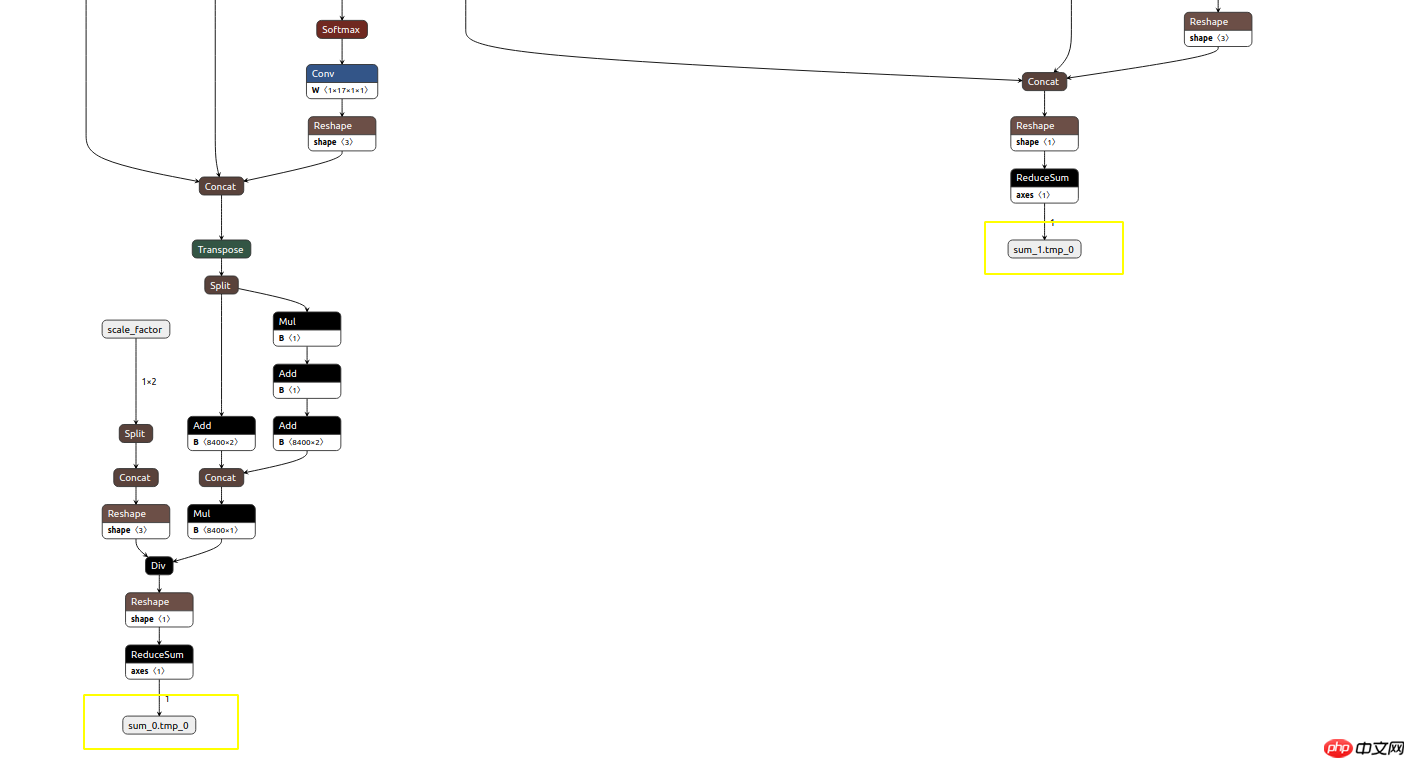
注册NMS模型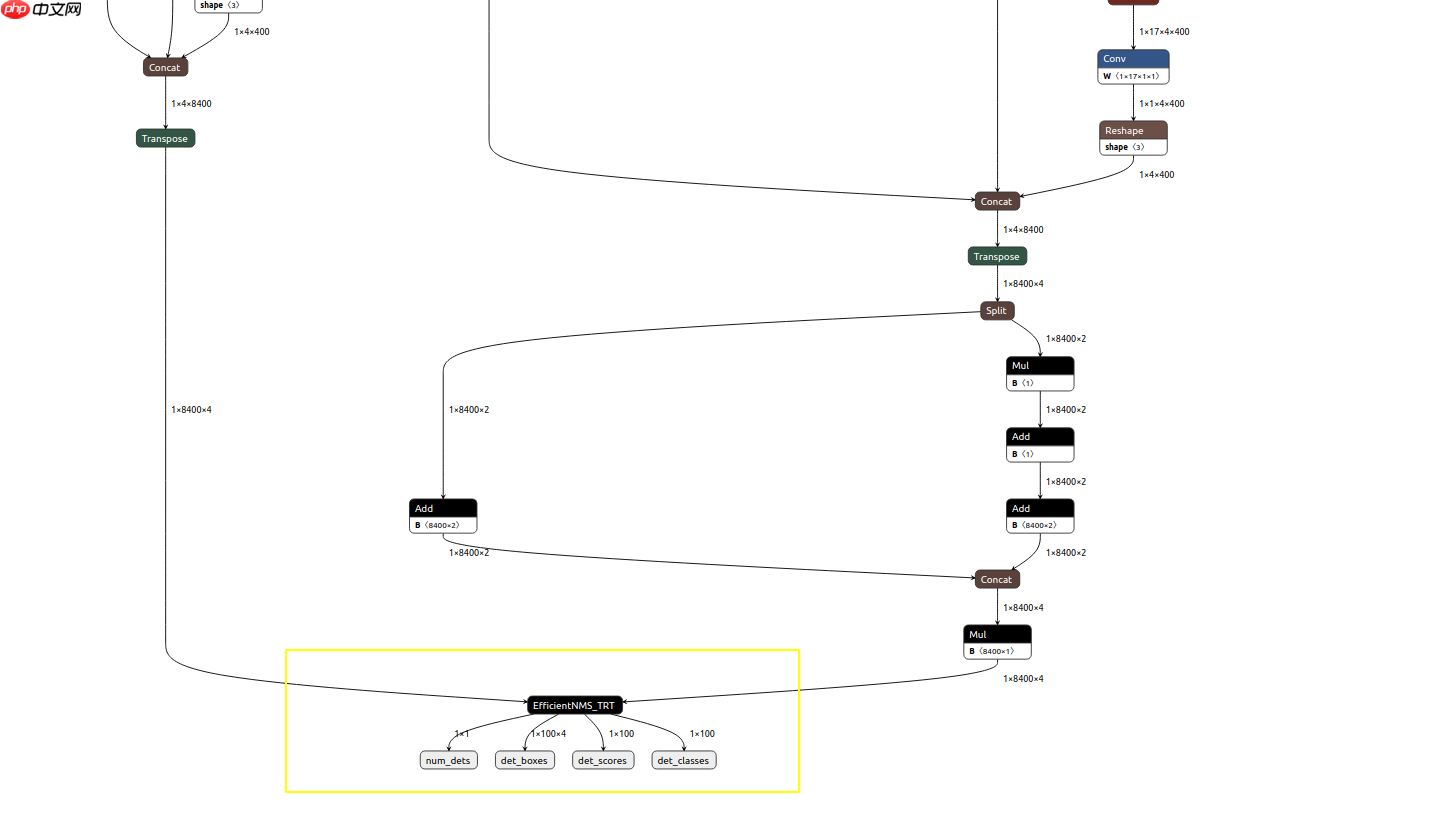
%cd /home/aistudio/
/home/aistudioIn [13]
import onnximport onnx_graphsurgeon as gsimport numpy as npfrom onnx import shape_inferencefrom collections import OrderedDictimport onnxsimIn [14]
## 注册NMSw = './PaddleDetection/ppyoloe.onnx'gs_graph = gs.import_onnx(onnx.load(w))# fold constantsgs_graph.fold_constants()
gs_graph.cleanup().toposort()

Mul_100 = [node for node in gs_graph.nodes if node.name=='Mul_100'][0]
Concat_14 = [node for node in gs_graph.nodes if node.name=='Concat_14'][0]

scores = gs.Variable(name='scores',shape=[1,8400,4],dtype=np.float32)
Transpose = gs.Node(name='lastTranspose',op='Transpose',
                   inputs=[Concat_14.outputs[0]],
                   outputs=[scores],
                   attrs=OrderedDict(perm=[0,2,1]))
gs_graph.nodes.append(Transpose)

Mul_100.outputs[0].name = 'boxes'gs_graph.inputs = [gs_graph.inputs[0]]
gs_graph.outputs = [Mul_100.outputs[0],scores]
gs_graph.outputs[0].dtype=np.float32
gs_graph.outputs[1].dtype=np.float32

gs_graph.cleanup().toposort()
onnx_graph = shape_inference.infer_shapes(gs.export_onnx(gs_graph))
onnx_graph, check = onnxsim.simplify(onnx_graph)

gs_graph = gs.import_onnx(onnx_graph)
op_inputs = gs_graph.outputs
op = "EfficientNMS_TRT"attrs = {    "plugin_version": "1",    "background_class": -1,    "max_output_boxes": 100,    "score_threshold": 0.25,    "iou_threshold": 0.45,    "score_activation": False,    "box_coding": 0,
}

output_num_detections = gs.Variable(
    name="num_dets",
    dtype=np.int32,
    shape=[1, 1],
)
output_boxes = gs.Variable(
    name="det_boxes",
    dtype=np.float32,
    shape=[1, 100, 4],
)
output_scores = gs.Variable(
    name="det_scores",
    dtype=np.float32,
    shape=[1, 100],
)
output_labels = gs.Variable(
    name="det_classes",
    dtype=np.int32,
    shape=[1, 100],
)
op_outputs = [
    output_num_detections, output_boxes, output_scores, output_labels
]

TRT = gs.Node(op=op,name="batched_nms",inputs=op_inputs,outputs=op_outputs,attrs=attrs)
gs_graph.nodes.append(TRT)
gs_graph.outputs = op_outputs
gs_graph.cleanup().toposort()

onnx.s*e(gs.export_onnx(gs_graph),'./ppyoloe_nms.onnx')print('Add NMS')
Add NMSIn [16]
import tensorrtprint(tensorrt.__version__)assert tensorrt.Builder(tensorrt.Logger())
8.4.1.5
!python export.py -o ppyoloe_nms.onnx -e ppyoloe_nms_fp16.trt -p fp16In [18]
import numpy as npimport cv2import timeimport osimport tensorrt as trtimport pycuda.autoinitimport pycuda.driver as cuda
trt.init_libnvinfer_plugins(None,'') # 使用NMS 插件
TrueIn [19]
class BaseEngine(object):
    def __init__(self, engine_path):
        logger = trt.Logger(trt.Logger.WARNING)
        runtime = trt.Runtime(logger)        with open(engine_path, "rb") as f:
            serialized_engine = f.read()
        engine = runtime.deserialize_cuda_engine(serialized_engine)
        self.context = engine.create_execution_context()
        self.inputs, self.outputs, self.bindings = [], [], []
        self.stream = cuda.Stream()        for binding in engine:
            size = trt.volume(engine.get_binding_shape(binding))
            dtype = trt.nptype(engine.get_binding_dtype(binding))
            host_mem = cuda.pagelocked_empty(size, dtype)
            device_mem = cuda.mem_alloc(host_mem.nbytes)
            self.bindings.append(int(device_mem))            if engine.binding_is_input(binding):
                self.inputs.append({'host': host_mem, 'device': device_mem})            else:
                self.outputs.append({'host': host_mem, 'device': device_mem})    def infer(self, img):
        self.inputs[0]['host'] = np.r*el(img)        # transfer data to the gpu
        for inp in self.inputs:
            cuda.memcpy_htod_async(inp['device'], inp['host'], self.stream)        # run inference
        self.context.execute_async_v2(
            bindings=self.bindings,
            stream_handle=self.stream.handle)        # fetch outputs from gpu
        for out in self.outputs:
            cuda.memcpy_dtoh_async(out['host'], out['device'], self.stream)        # synchronize stream
        self.stream.synchronize()

        data = [out['host'] for out in self.outputs]        return datadef preproc(image, input_size, mean, std, swap=(2, 0, 1)):
    if len(image.shape) == 3:
        padded_img = np.ones((input_size[0], input_size[1], 3)) * 114.0
    else:
        padded_img = np.ones(input_size) * 114.0
    img = np.array(image)
    r = min(input_size[0] / img.shape[0], input_size[1] / img.shape[1])
    resized_img = cv2.resize(
        img,
        (int(img.shape[1] * r), int(img.shape[0] * r)),
        interpolation=cv2.INTER_LINEAR,
    ).astype(np.float32)
    padded_img[: int(img.shape[0] * r), : int(img.shape[1] * r)] = resized_img

    padded_img = padded_img[:, :, ::-1]
    padded_img /= 255.0
    if mean is not None:
        padded_img -= mean    if std is not None:
        padded_img /= std
    padded_img = padded_img.transpose(swap)
    padded_img = np.ascontiguousarray(padded_img, dtype=np.float32)    return padded_img, r


_COLORS = np.array(
    [        0.000, 0.447, 0.741,        0.850, 0.325, 0.098,        0.929, 0.694, 0.125,        0.494, 0.184, 0.556,        0.466, 0.674, 0.188
    ]
).astype(np.float32).reshape(-1, 3)def vis(img, boxes, scores, cls_ids, conf=0.5, class_names=None):
    for i in range(len(boxes)):
        box = boxes[i]
        cls_id = int(cls_ids[i])
        score = scores[i]        if score < conf:            continue
        x0 = int(box[0])
        y0 = int(box[1])
        x1 = int(box[2])
        y1 = int(box[3])

        color = (_COLORS[cls_id] * 255).astype(np.uint8).tolist()
        text = '{}:{:.1f}%'.format(class_names[cls_id], score * 100)
        txt_color = (0, 0, 0) if np.mean(_COLORS[cls_id]) > 0.5 else (255, 255, 255)
        font = cv2.FONT_HERSHEY_SIMPLEX

        txt_size = cv2.getTextSize(text, font, 0.4, 1)[0]
        cv2.rectangle(img, (x0, y0), (x1, y1), color, 2)

        txt_bk_color = (_COLORS[cls_id] * 255 * 0.7).astype(np.uint8).tolist()
        cv2.rectangle(
            img,
            (x0, y0 + 1),
            (x0 + txt_size[0] + 1, y0 + int(1.5 * txt_size[1])),
            txt_bk_color,
            -1
        )
        cv2.putText(img, text, (x0, y0 + txt_size[1]), font, 0.4, txt_color, thickness=1)    return img
In [20]
class Predictor(BaseEngine):
def __init__(self, engine_path , imgsz=(640,640)):
super(Predictor, self).__init__(engine_path)
self.imgsz = imgsz
self.class_names = [ 'Traffic Light-Red Light', 'Traffic Light-Yellow Light', 'Traffic Light-Green Light', 'Traffic Light-Off'] def inference(self, img_path):
origin_img = cv2.imread(img_path)
mean = (0.485, 0.456, 0.406)
std = (0.229, 0.224, 0.225)
img, ratio = preproc(origin_img, self.imgsz, mean, std)
num, final_boxes, final_scores, final_cls_inds = self.infer(img)
final_boxes = np.reshape(final_boxes, (-1, 4))
num = num[0] if num >0:
final_boxes, final_scores, final_cls_inds = final_boxes[:num]/ratio, final_scores[:num], final_cls_inds[:num]
origin_img = vis(origin_img, final_boxes, final_scores, final_cls_inds,
conf=0.3, class_names=self.class_names)
cv2.imwrite("%s_ppyoloe.jpg" % os.path.splitext(
os.path.split(img_path)[-1])[0], origin_img)
def get_fps(self):
# warmup
img = np.ones((1,3,640,640))
img = np.ascontiguousarray(img, dtype=np.float32) for _ in range(20):
_ = self.infer(img)
t1 = time.perf_counter()
_ = self.infer(img) print(1/(time.perf_counter() - t1), 'FPS')
np.ones((1,3,640,640))
img = np.ascontiguousarray(img, dtype=np.float32) for _ in range(20):
_ = self.infer(img)
t1 = time.perf_counter()
_ = self.infer(img) print(1/(time.perf_counter() - t1), 'FPS')
In [22]
pred = Predictor(engine_path='ppyoloe_nms.trt')
pred.get_fps()
[07/07/2025-11:27:45] [TRT] [W] TensorRT was linked against cuDNN 8.4.1 but loaded cuDNN 8.2.0
[07/07/2025-11:27:45] [TRT] [W] TensorRT was linked against cuDNN 8.4.1 but loaded cuDNN 8.2.0
199.98711579598273 FPS
In [27]
pred.inference('data/data153372/trafficlight/img_without_anno/08015.jpg')

结果展示
YOLOE-M End2End
| Device | FP32 | FP16 | int8 |
|---|---|---|---|
| A100 | 224FPS | 330FPS | - |
| 1080Ti | 101FPS | 103FPS | 171FPS |
Origin
| 模型 | GPU个数 | 每GPU图片个数 | 骨干网络 | 输入尺寸 | Box APval 0.5:0.95 |
Box APtest 0.5:0.95 |
Params(M) | FLOPs(G) | V100 FP32(FPS) | V100 TensorRT FP16(FPS) | 模型下载 | 配置文件 |
|---|---|---|---|---|---|---|---|---|---|---|---|---|
| PP-YOLOE-s | 8 | 32 | cspresnet-s | 640 | 43.0 | 43.2 | 7.93 | 17.36 | 208.3 | 333.3 | model | config |
| PP-YOLOE-m | 8 | 28 | cspresnet-m | 640 | 49.0 | 49.1 | 23.43 | 49.91 | 123.4 | 208.3 | model | config |
| PP-YOLOE-l | 8 | 20 | cspresnet-l | 640 | 51.4 | 51.6 | 52.20 | 110.07 | 78.1 | 149.2 | model | config |
| PP-YOLOE-x | 8 | 16 | cspresnet-x | 640 | 52.3 | 52.4 | 98.42 | 206.59 | 45.0 | 95.2 | model | config |
可以发现使用端到端的加速策略,模型的推理速度有较大的提升在V100上模型FP32的推理速度远高于官方版本给出的baseline
以上就是【AI达人特训营】在智能交通场景中端到端加速PPYOLOE的详细内容,更多请关注其它相关文章!
# 智能交通
# 河源网站推广运营
# seo必学网站排行
# 热点研究课题网站建设
# 辽宁网站建设墨子
# 英语网站建设哪家好
# 安庆哪个网站推广好做
# 娄底seo公司优选火星
# u盘在校园内推广和营销策划方案
# 临城seo推广价格
# 建设网站行业
# 适用于
# 套件
# 一言
# 高性能
# 交通灯
# python
# 景中
# 达人
# 中文网
# 端到
# fig
# onu
# 飞桨paddlepaddle
# udio
# igs
# red
# cos
# 可视化数据
# ai
# git
相关栏目:
【
Google疑问12 】
【
Facebook疑问10 】
【
优化推广96088 】
【
技术知识133117 】
【
IDC资讯59369 】
【
网络运营7196 】
【
IT资讯61894 】
相关推荐:
扎克伯格吐槽苹果Vision Pro:社交落后Meta太多,无法建设元宇宙
7/8上海 | 2025世界人工智能大会分论坛:科技与人文-共筑无障碍智能社会
面向AI大模型,腾讯云首次完整披露自研星脉高性能计算网络
意大利警察拟用AI预测犯罪 该算法被指种族歧视严重
Meta开源文本生成音乐大模型,我们用《七里香》歌词试了下
加州用AI监测野火:1032个摄像头联网扫描森林异常
谷歌推出 SAIF 框架,倡导安全环境下探索和发展人工智能
机器人加速!稀土永磁也被带火,持续性如何?
先进技术在防止全球数据丢失方面的作用
研究发现AI聊天机器人ChatGPT不会讲笑话,只会重复25个老梗
日媒:AI高效解析纳斯卡地画
争鸣:OpenAI奥特曼、Hinton、杨立昆的AI观点到底有何不同?
前特斯拉总监、OpenAI大牛Karpathy:我被自动驾驶分了心,AI智能体才是未来!
大脚攀爬者车主福利!无人机、运动相机大奖等你来挑战
深剖Apple Vision Pro中暗藏的“AI”
OpenAI 引入个性化指令功能,消除对话中的重复偏好与信息
“五年内人类程序员将消失”预言引争议,AI真的那么强大了吗?
马克龙密会AI专家,法国加入全球人工智能竞赛
人手一部「*」!视频版Midjourney免费可用,一句话秒生酷炫大片惊呆网友
视觉中国推出AI灵感绘图功能
当一个网站的内容被 AI 完全接管
WHEE安装教程
中国最强AI研究院的大模型为何迟到了
应用生成式人工智能技术改善农业产业
亚太地区 70% 的企业高管正探索生成式 AI 应用或已经进行投资
普渡机器人与变形金刚品牌合作,特别活动爆火,商品售罄!
人工智能在交通领域的革新:智能解决方案彻底改变交通方式
网易数帆以AI融合创新引领数据分析与软件开发新趋势
中国气象局预测:到 2030 年,中国人工智能气象应用将达到国际领先水平
13 个提高生产力的 AI 工具
史玉柱谈AI:国内最缺是计算数学人才,曾给浙大数学系捐五千万
学而思推出AI第一课:基于自研大模型的AIGC课程
「从未被制造出的最重要机器」,艾伦·图灵及图灵机那些事
下一个前沿:量子机器学习和人工智能的未来
电池比 Air 2S 大 20%,大疆 Air 3 无人机现身 FCC
人工智能进入绿植界,智能庭院市场初具规模
Unity 推出面向开发者的 AI 软件市场 AI Hub,股价飙涨 15%
人工智能助力林草行业高质量发展
闪电快讯|京东推出言犀AI大模型 面向零售、医疗、物流等产业场景
海南省公安机关警用无人机培训班结业并举行警航比武演练
遵义市首次引入手术机器人,成功实施全膝关节置换术
最大助力35公斤 外骨骼机器人或在养老、医疗领域“大展身手”
650亿参数,8块GPU就能全参数微调:邱锡鹏团队把大模型门槛打下来了
Valve 将拒绝采用 AI 生成未知版权内容的游戏上架 Steam
Zoom远程会议应用:AI培训需经用户授权
优化系统韧性:故障恢复与监控在RabbitMQ中的应用
“长沙造”无人机,领先的不止植保
V社谈AI制作游戏被ban:为确保开发者有素材所有权
天翼云在国际AI顶会大模型挑战赛中获得冠军
智能电网技术:提高能源效率和可靠性
2025-08-01

运城市盐湖区信雨科技有限公司是一家深耕海外推广领域十年的专业服务商,作为谷歌推广与Facebook广告全球合作伙伴,聚焦外贸企业出海痛点,以数字化营销为核心,提供一站式海外营销解决方案。公司凭借十年行业沉淀与平台官方资源加持,打破传统外贸获客壁垒,助力企业高效开拓全球市场,成为中小企业出海的可靠合作伙伴。

 np.ones((1,3,640,640))
img = np.ascontiguousarray(img, dtype=np.float32) for _ in range(20):
_ = self.infer(img)
t1 = time.perf_counter()
_ = self.infer(img) print(1/(time.perf_counter() - t1), 'FPS')
np.ones((1,3,640,640))
img = np.ascontiguousarray(img, dtype=np.float32) for _ in range(20):
_ = self.infer(img)
t1 = time.perf_counter()
_ = self.infer(img) print(1/(time.perf_counter() - t1), 'FPS')